


 Continue with Google
The order, every month
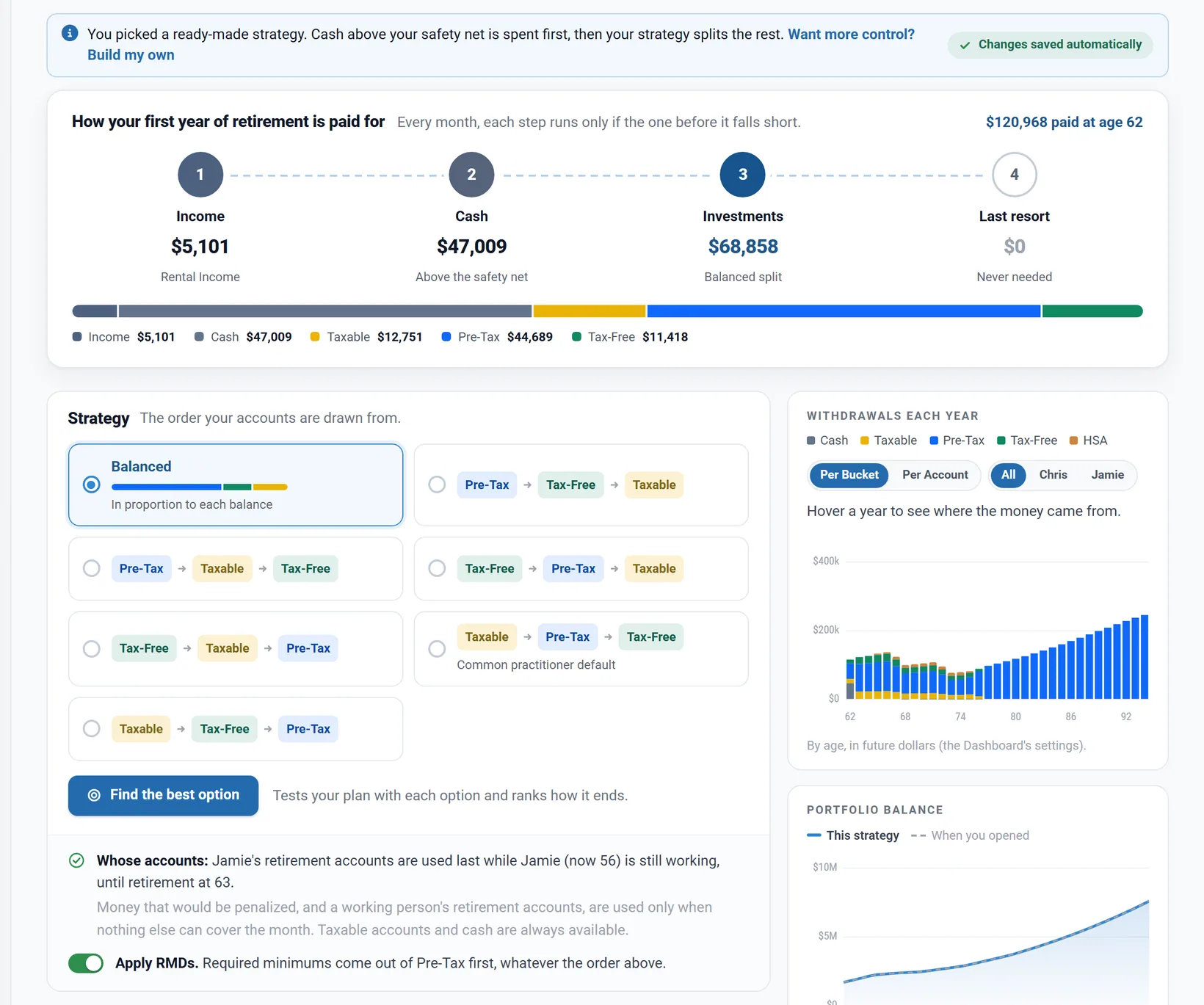
Every month of retirement, your spending is paid in four steps. Each step is used only if the one before falls short:
- Income. Social Security, pensions, annuities, rent from a rental, Retirement Income, Other Income and any salary.
- Cash. By default, cash above your minimum balances is spent before any investment is touched.
- Investments. Your pre-tax, tax-free (Roth) and taxable accounts, in the order your withdrawal strategy sets. The plan withdraws enough to cover the tax those withdrawals cause.
- Last resort. Cash below your minimum balances, only once the investments cannot pay the month. After that, any spending that cannot be paid is shown as a shortfall.
Income left over after a month's spending lands in cash. Withdrawal order, on the Withdrawals tab, shows these four steps as a numbered ladder for your first year of retirement. For Chris and Jamie, from June the year Chris turns 62:
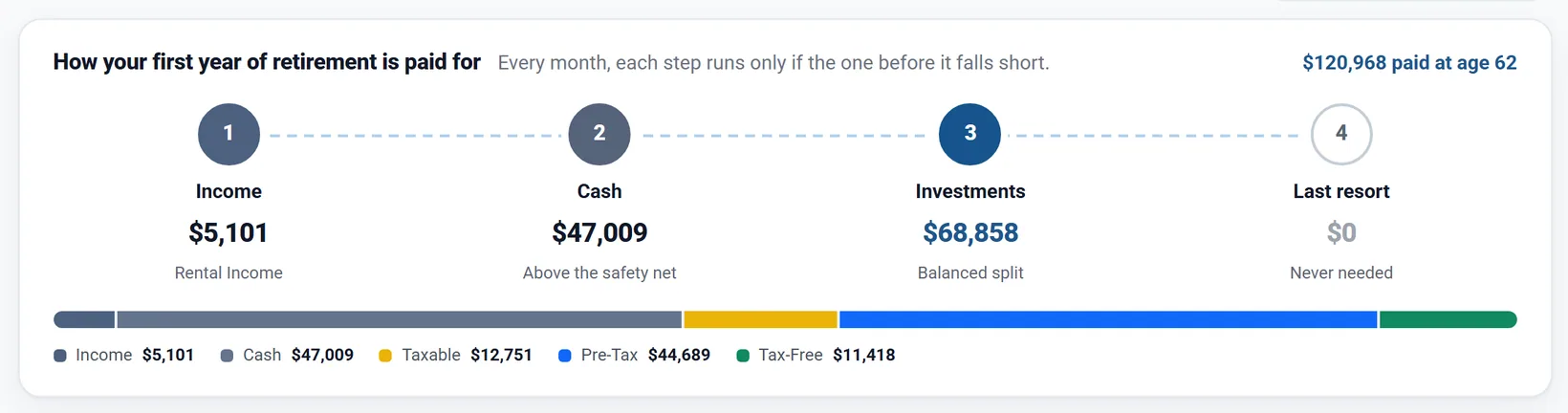
- All your cash accounts (checking, savings, CDs, money market, the Master Cash Account) form one pool. You cannot pick which one pays.
- Before you retire, if your Employment Income falls short of your spending, the gap comes from cash first, whatever your cash choice. The cash choices start at retirement.
- With the spending mode Using the 4% Rule, or with Make withdrawals in addition to other income on, the plan withdraws its set amount whatever cash it holds: the cash step, the cash choices and minimum balances do not apply.
The Withdrawals tab
Everything about where your retirement money comes from is on one tab, Withdrawals, in the header and in the left menu. It has three pages:
- Withdrawal order: when your cash is spent and the order of your accounts. The tab opens here, and the rest of this page is about it.
- Roth & tax moves: Roth conversions, extra Pre-Tax withdrawals that fill a tax bracket, and your limits (see Roth conversions and tax strategy). On a US plan with no Roth account the page is named Tax moves; in Canada and the UK, Bracket filling.
- Optimizer: a search that tries other settings for the first two pages (see The Optimizer).
An overview sits at the top of Withdrawal order, and its figures stay in view as you scroll. The other two pages show only the page names and the dollars pill (and the change line, when there is one):
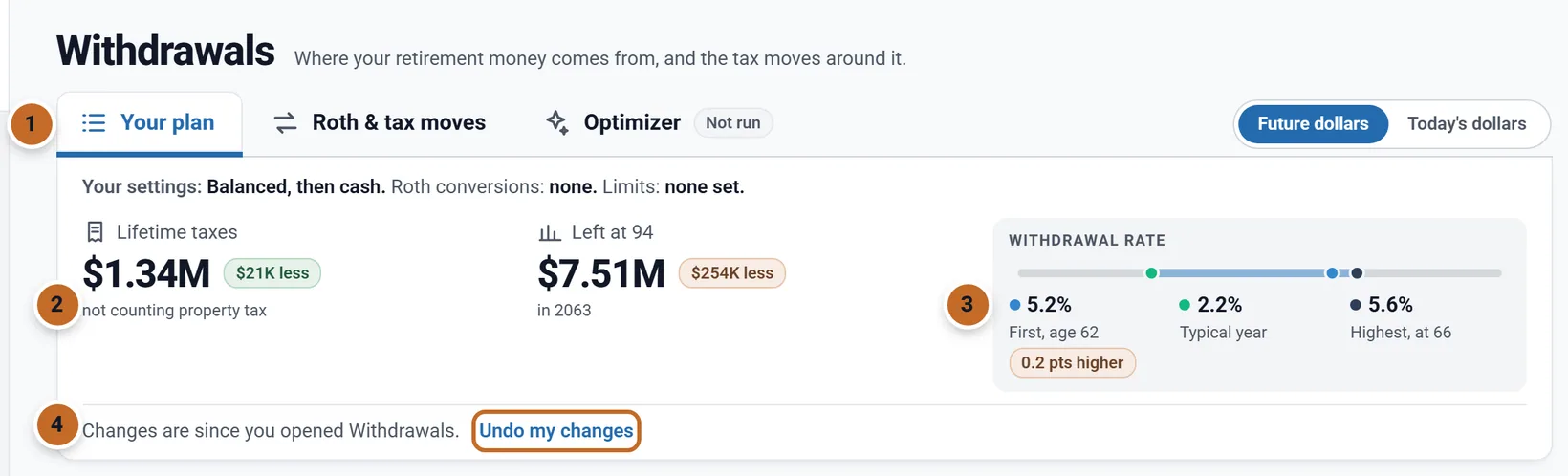
- The three pages. Withdrawal order, Roth & tax moves and Optimizer, which carries the state of its search: Not run, Up to date or Out of date: run again. The Your settings line under them says what your plan sets: when cash is spent and your strategy, your Roth conversions and your limits.
- Two outcomes. Lifetime taxes does not count property tax. Beside it is what is left at the end of your plan, or the age your money lasts until if it runs out.
- Withdrawal rate. Three figures on one small line: First (your first year of retirement), Typical year (the middle year) and Highest (see Your withdrawal rate, year by year).
- The change line. Once you have changed something, this line says so and offers Undo my changes. Until then there is nothing here.
- The pill at the right of the page names switches Lifetime taxes and what is left between Future dollars and Today's dollars. It is the same choice as on the Dashboard. On a narrow window the pill sits above the withdrawal rates.
- After you change a setting, a small label beside each figure that moved says how far, in words (for example "$21K less"), since you opened Withdrawals. A figure that did not move has no label. The comparison starts again each time you open the tab or load a plan.
- When you scroll down, the overview folds to one line that stays in view: the page names, then Lifetime taxes, what is left and the three withdrawal rates.
- Undo my changes asks first, then puts every setting in your plan back to how it was when you opened Withdrawals, including settings you changed in the left column. Account and budget edits stay as they are.
- After you use an Optimizer result, the overview also offers Go back to my settings (see The Optimizer).
The overview has no charts of its own. Each page has its own: Withdrawal order has Withdrawals each year and Portfolio balance beside its steps, Roth & tax moves has Portfolio and Withdrawals tabs in its Roth conversions card, and the Optimizer's result has charts of its own.
Pick a strategy or Build my own
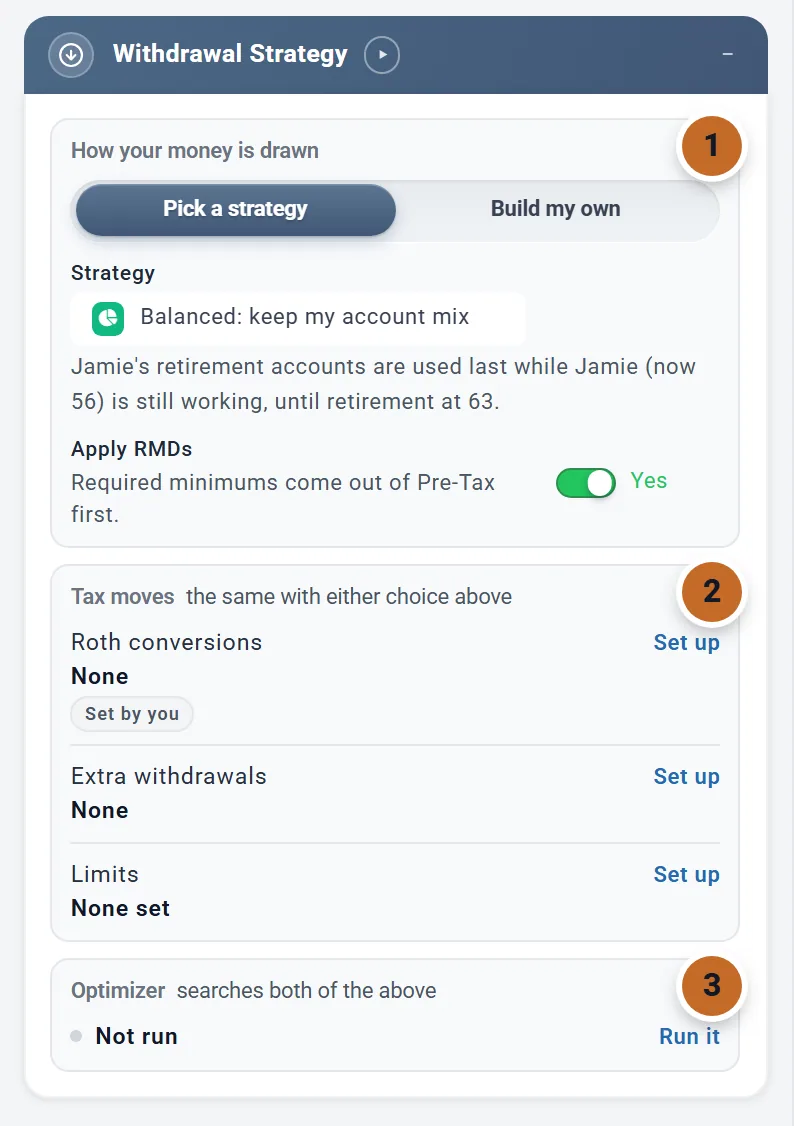
The settings start in the Withdrawal Strategy box, in the left column under Retirement Spending. It has three sections:
- How your money is drawn: the switch Pick a strategy or Build my own, and what it controls.
- Tax moves: your Roth conversions, extra Pre-Tax withdrawals and limits in words, each with a link to Roth & tax moves. They are the same with either choice above.
- Optimizer: the state of its search, with Run it, or See result once a search is up to date.
New plans start on Pick a strategy: a Strategy dropdown (the seven strategies), a line saying whose accounts are used last (see Whose accounts are used first) and Apply RMDs (Yes or No). It always spends cash first; the "?" beside Strategy says so. Folded, the box shows a one-line summary, for example "Balanced · Optimizer not run".
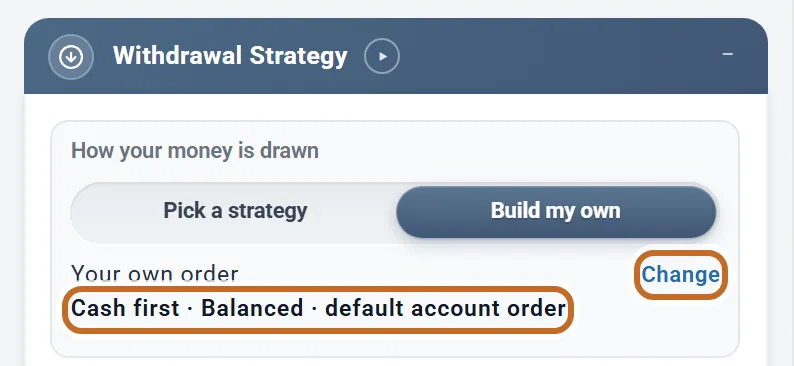
Choose Build my own to use every setting on this page. Withdrawal order opens, and the box then shows Your own order with a one-line summary ("Cash first · Balanced · default account order") and Change, which opens Withdrawal order again.
Your plan saves as you go; there is no Save button. Going back to Pick a strategy keeps your Build my own settings for later.
Still used on Pick a strategy: your strategy, Find the best option, Apply RMDs, each cash account's minimum balance, Cash that builds up in retirement, Extra Withdrawals and your tax moves. Not used: the cash choices, the custom mix, reinvesting unused RMDs and the account order within a bucket. On a Pick a strategy plan, Withdrawal order is a shorter page: the ladder, one Strategy card, the Tax moves card and Cash that builds up in retirement, with the charts beside them. The settings it does not use are not shown. Want more control? Build my own at the top switches, and if your plan holds Build my own settings the same line says they are kept.
Withdrawal order, step by step
On Build my own, Withdrawal order lists the steps under the ladder, each with the same number as on the ladder:
- Guaranteed income goes first (automatic): your income sources and what each pays.
- Cash accounts: when your cash gets spent and cash that builds up.
- Investment accounts: the order of your accounts, whose accounts and required minimums.
- If everything runs out (automatic): the last resort, with a note saying whether your plan ever reaches it.
Tax moves sits just above Investment accounts, marked with a ring instead of a number: tax moves happen before that step (see Tax moves come first).
Each step's charts sit beside it, or under it in a narrow window:
- Cash accounts: Your cash over time.
- Tax moves: Taxes each year, and Roth conversions each year when your plan converts.
- Investment accounts: Withdrawals each year (Per Bucket or Per Account, for everyone or one person), Portfolio balance and Required minimums (RMDs).
Change a setting and the charts redraw. Portfolio balance draws a dashed line, When you opened, for your plan as it was when you opened Withdrawals, and after a change it says how far the ending balance has moved.
When your cash gets spent
On Build my own, the Cash accounts card on Withdrawal order rests folded: under its title, one line says what your plan does with cash, for example "Spend cash first. Safety net $45,000, $30,000 spendable." Select Change at the end of that line, or the title, to open the card ("Choose when your cash gets spent."), and Done or the title to fold it again. It is folded each time you come back to the page. If the choice has a problem, such as cash below your safety net, the folded line says so. Opened, the card has four choices:
- Spend cash first (the default): cash above your minimum balances pays before investments are touched.
- Hold cash in reserve: investments pay from day one. Cash is used only if they run out.
- Custom amounts Planner+: draw how much cash may be used each year, for example to bridge the years before Social Security.
- Cash bucket Planner+: keep a cushion of cash for years your investments lose money, and refill it after good years (see Cash bucket).
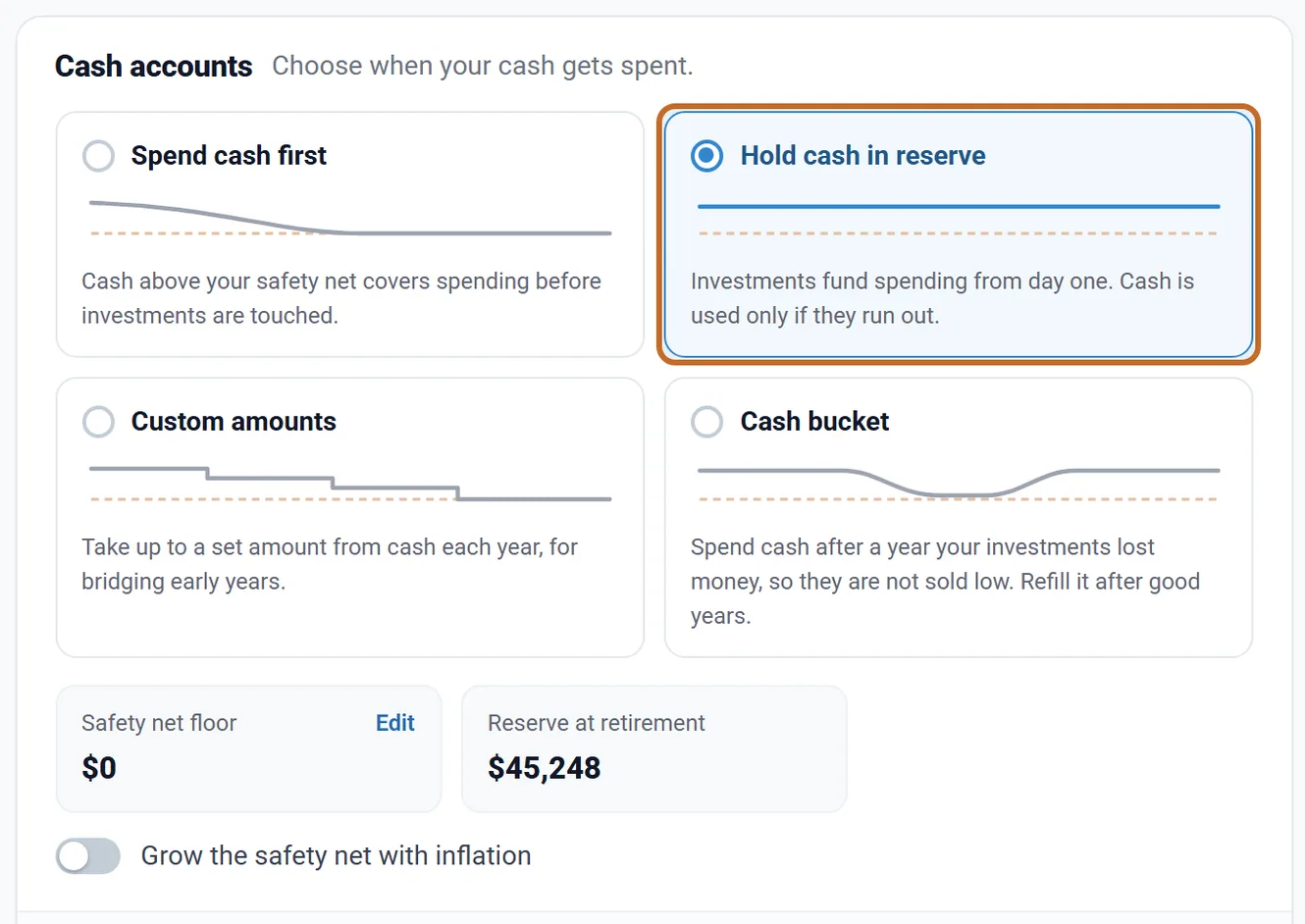
With Hold cash in reserve the four steps change order: investments pay before cash. The Cash accounts card moves below Investment accounts while the page follows it, and the ladder and the steps take their new numbers.
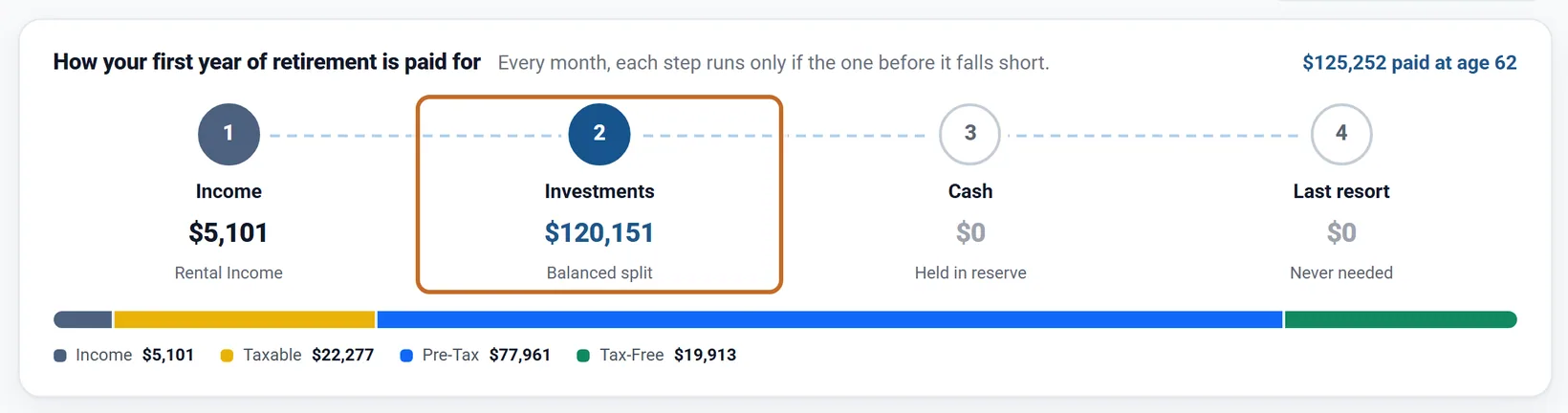
Holding Chris and Jamie's $45,000 of cash leaves about $254,000 less at 94 and about $21,000 less in lifetime taxes, in future dollars: selling investments instead of spending cash leaves less invested, and their cash earns less than their investments. The overview at the top of the tab shows each change since you opened Withdrawals (see The Withdrawals tab).
Custom amounts
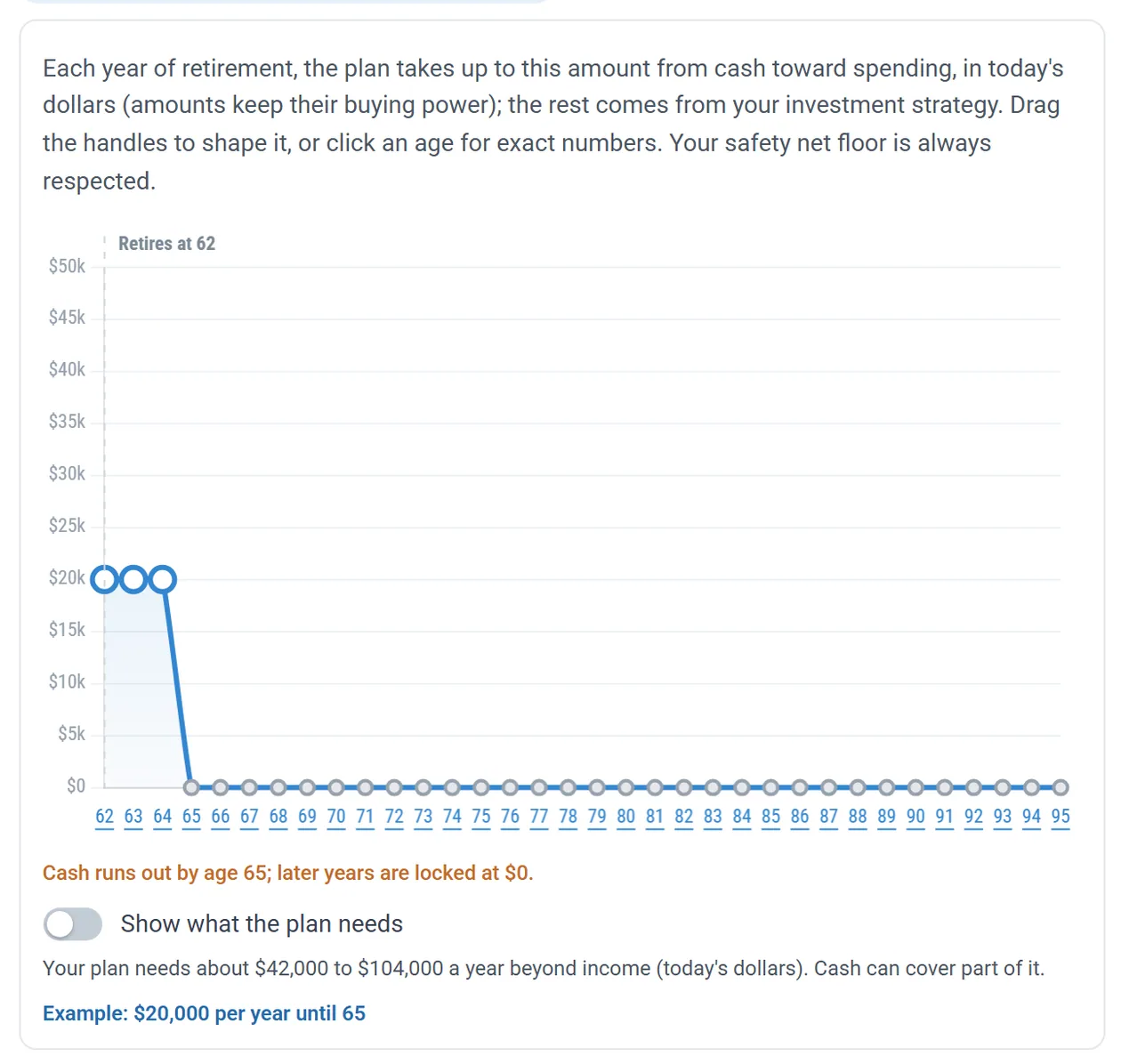
A graph from your retirement to the end of your plan. Each year's point is the most cash the plan may use that year, in today's dollars (the amounts keep their buying power); the plan never takes more than it needs beyond income. Drag a point, or click an age to type a number. Once cash above your minimums runs out, later years are locked at $0.
The top of the graph follows the cash you could spend: the larger of your highest amount and the cash above your safety net at retirement, never more than your plan needs in its largest year. It moves up when you drag a point to the top or type a larger number. A line under the graph says what your plan needs beyond income each year; switch on Show what the plan needs to draw that as a dashed line, which stretches the graph to fit it. The switch is remembered on this device and is not part of your plan.
Cash bucket Planner+
A cushion of cash for bad years. You set its size in today's dollars, on top of your minimum balances; it keeps its buying power. In the month you retire, and every January after, the plan looks at what your investments earned over the last 12 months:
- They lost money (a down year): cash above your minimum balances pays for spending first, so your investments are not sold after they fell. Over several down years in a row the bucket can run down to your minimum balances; then your investments pay.
- Anything else (a good year): your investments pay for spending and the bucket is held. If it is below its size, the plan tops it back up from your investments, in your withdrawal order. That withdrawal is taxed like any other, and the money lands in cash the month after.
Cash above the bucket is still spent first. Cash that builds up in retirement never moves the bucket's cash into a brokerage account. The bucket does nothing with Using the 4% Rule or with Make withdrawals in addition to other income, which take their withdrawal whatever cash you hold. Next to the size, the page shows it as years of the spending your other income does not cover in your first year of retirement, with quick picks for 1, 2 and 3 years.
Where you see what it does. The Dashboard uses steady average returns, so every year there is a good year: the bucket is filled when you retire and stays full, and the Dashboard shows only what holding that cash costs. Chance of Success runs your plan through real market history (or simulated futures), and that is where the bucket gets spent. While it is on, Chance of Success has a Cash Bucket sub-tab: how often the bucket was used, any one market year by year, and Compare with spending cash first.
Find the best size. Find the best size runs your plan through the same markets as Chance of Success (market history or simulated futures) with spending cash first and with buckets from half a year to five years, then ranks them: chance of success first, then the ending balance in bad markets (the worst 1 in 10), then the typical ending, all in today's dollars. A size is called best only when it keeps your plan funded in at least 2 more markets than spending cash first, or leaves clearly more in bad markets. Often no size does: cash earns less than investments over time, and every refill is a taxed withdrawal, so a bucket usually costs a little. Some people keep one anyway for peace of mind; the table shows what it costs.
Keep a minimum in cash
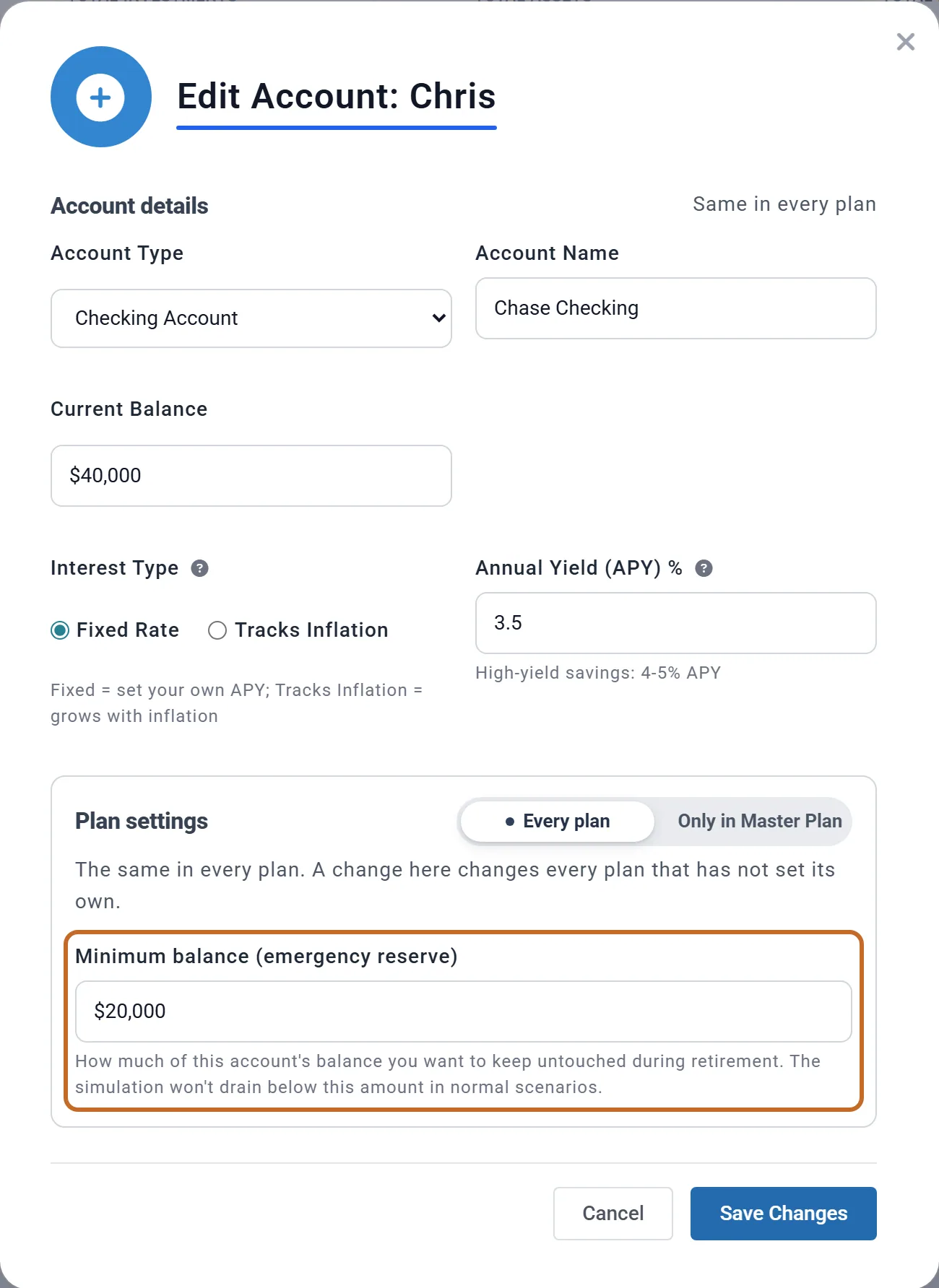
To keep an emergency fund, give a cash account a minimum balance. It works with Pick a strategy and Build my own, and with every cash choice. Planner+
- On Accounts & Assets, edit the cash account.
- Enter Minimum balance (emergency reserve).
- Choose Save Changes.
The plan never spends below the total of your minimums (Withdrawal order calls it the Safety net floor) until your investments run out. Extra Withdrawals and education costs respect it too.
- It is a fixed dollar amount. On Build my own, Grow the safety net with inflation keeps its buying power.
- It protects that amount, not the account: with Spend cash first, cash above it is still spent first.
- The 4% Rule mode and Make withdrawals in addition to other income do not keep it.
Cash that builds up
Required minimum distributions (RMDs) larger than your spending, and income you do not spend, land in cash. In Chris and Jamie's plan cash is spent at 62, then from about 77 it grows every year, passing $1 million at 92.
The section says what your own plan does. When cash builds up, it shows about how much, between which ages, the largest source when one stands out, and whether it stays in cash or is moved. When nothing builds up, it says so. The section rests folded: select Change at the end of that line, or the title, to open it and choose where the cash goes (a later sale or inheritance can make the choice matter even when nothing builds up today).
A small chart, New cash each year, shows the cash that builds up in each year of retirement, one bar a year, in the page's dollars. Cash that stays is drawn in the cash colour and cash that is moved in the brokerage colour. It is each year's own amount, not a running total: Your cash over time beside the Cash step shows the balance. There is no chart when nothing builds up.
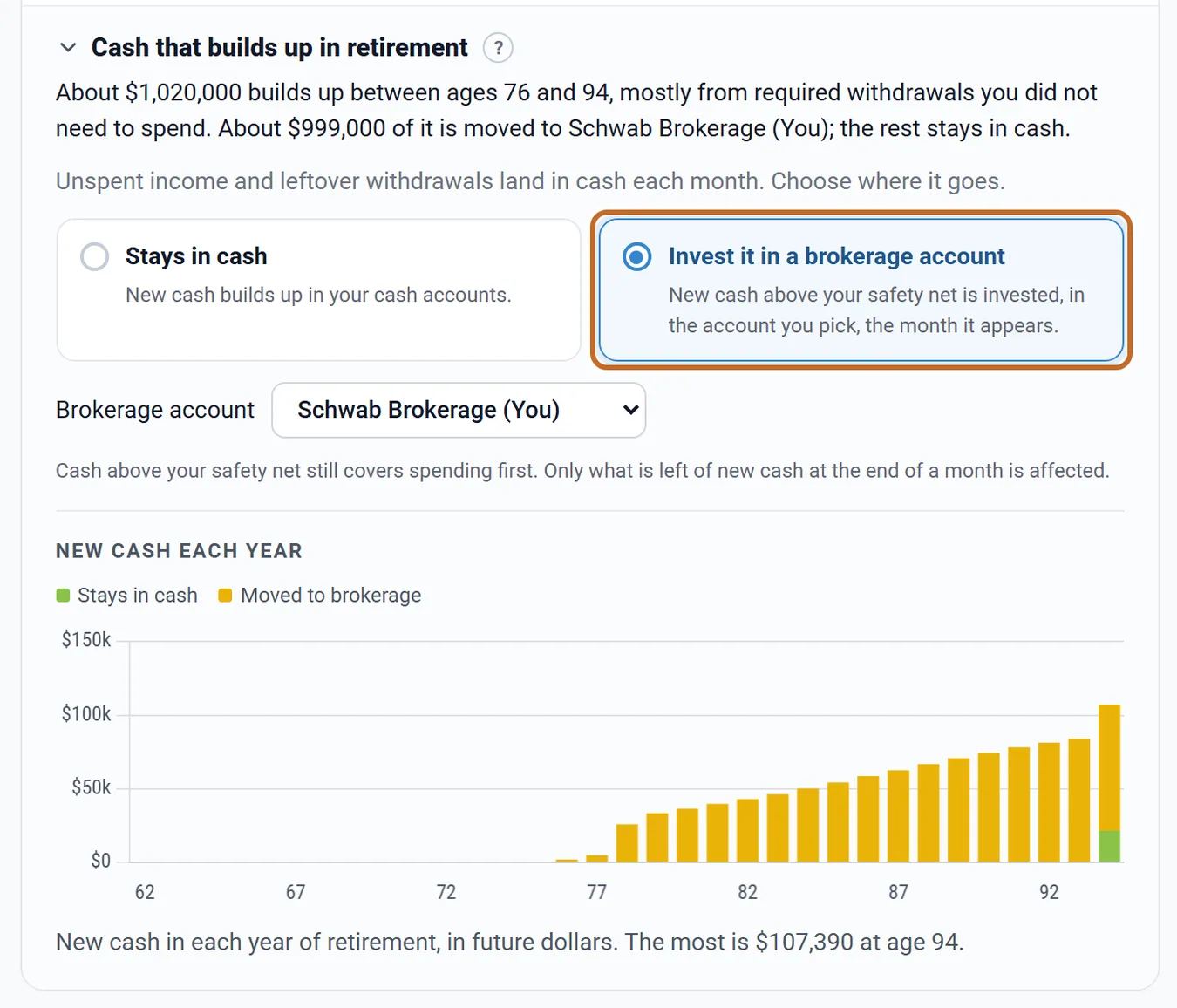
Invest it in a brokerage account moves each month's new cash above your minimums into the brokerage account you pick, from your first month of retirement. It works with Pick a strategy and Build my own. The cash you carry into retirement and your minimums are never moved, and the move itself is not taxed (the money was taxed already). Cash a planned purchase paid from cash will need is kept back too: once it is in cash (from a sale sent to cash, say), it stays there for the purchase, and spending does not use it. For Chris and Jamie, $1,008,999 is invested in Schwab Brokerage over retirement.
Extra Pre-Tax withdrawals that fill a tax bracket count as new cash too. With Monthly Expenses they go to the account you pick, and the Optimizer's card says so instead of offering cash. With Monthly Income they first put back any cash your spending used that month.
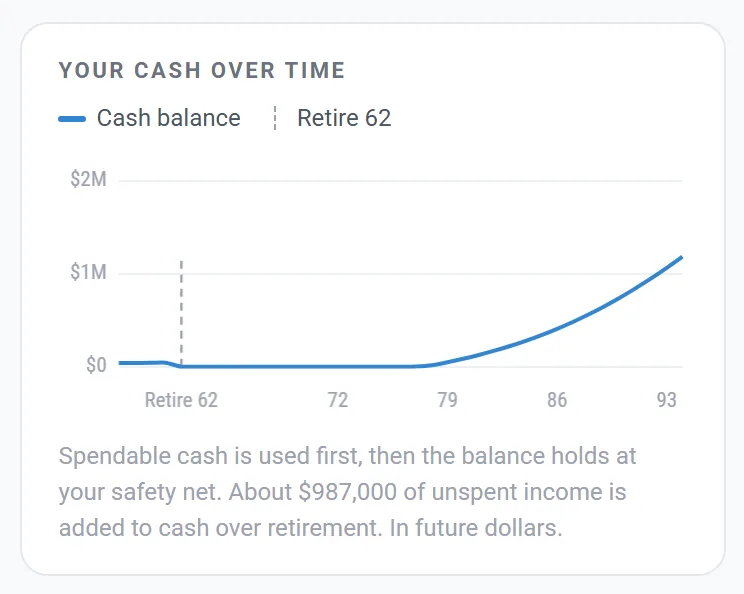
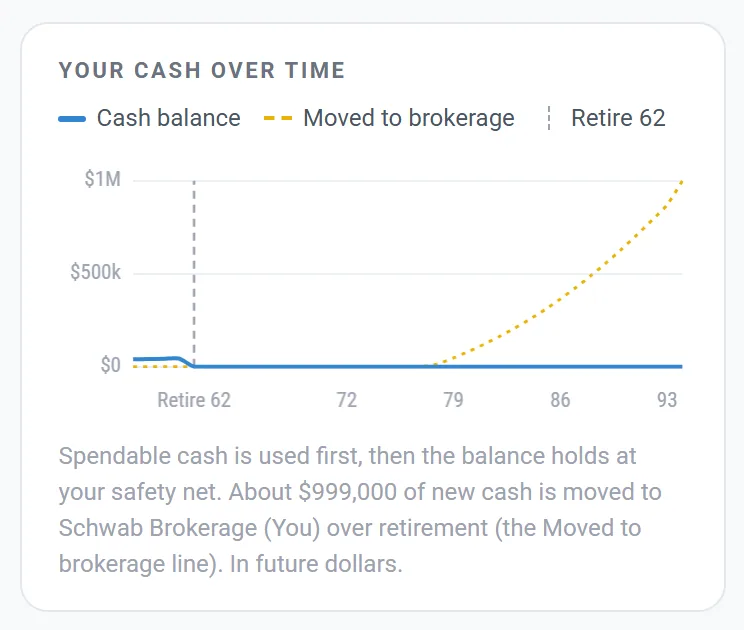
With Invest it in a brokerage account, Your cash over time also draws a dotted Moved to brokerage line: the running total moved so far.
It is not used in the 4% Rule or "withdrawals on top" modes, nor once your investments are used up. Only taxable accounts are offered; do not pick a 529 plan.
The order of your investment accounts
The Investment accounts card on Withdrawal order ("The order your three tax buckets are drawn from.") offers seven presets, the same seven as the Strategy dropdown in the Withdrawal Strategy box. On a Pick a strategy plan the card is named Strategy.
- Balanced (the default): every withdrawal is split in proportion to each bucket's balance.
- Six fixed orders, such as Taxable → Pre-Tax → Tax-Free (marked "Common practitioner default"): the first bucket pays until it is empty, then the next.
Find the best option runs your plan with each preset and shows each one's ending balance, ranked first by whether the plan lasts, then by what your savings would be worth after tax (pre-tax money counted after your Estate tab's Tax-Deferred Rate, 25% unless you change it). It then puts the best option on for you, even when it wins by only a little, and says what it gains; Go back to returns to the option you had. If the option you had ties the best, it stays. Each card shows the ending balance before tax, with what is left after tax under it.
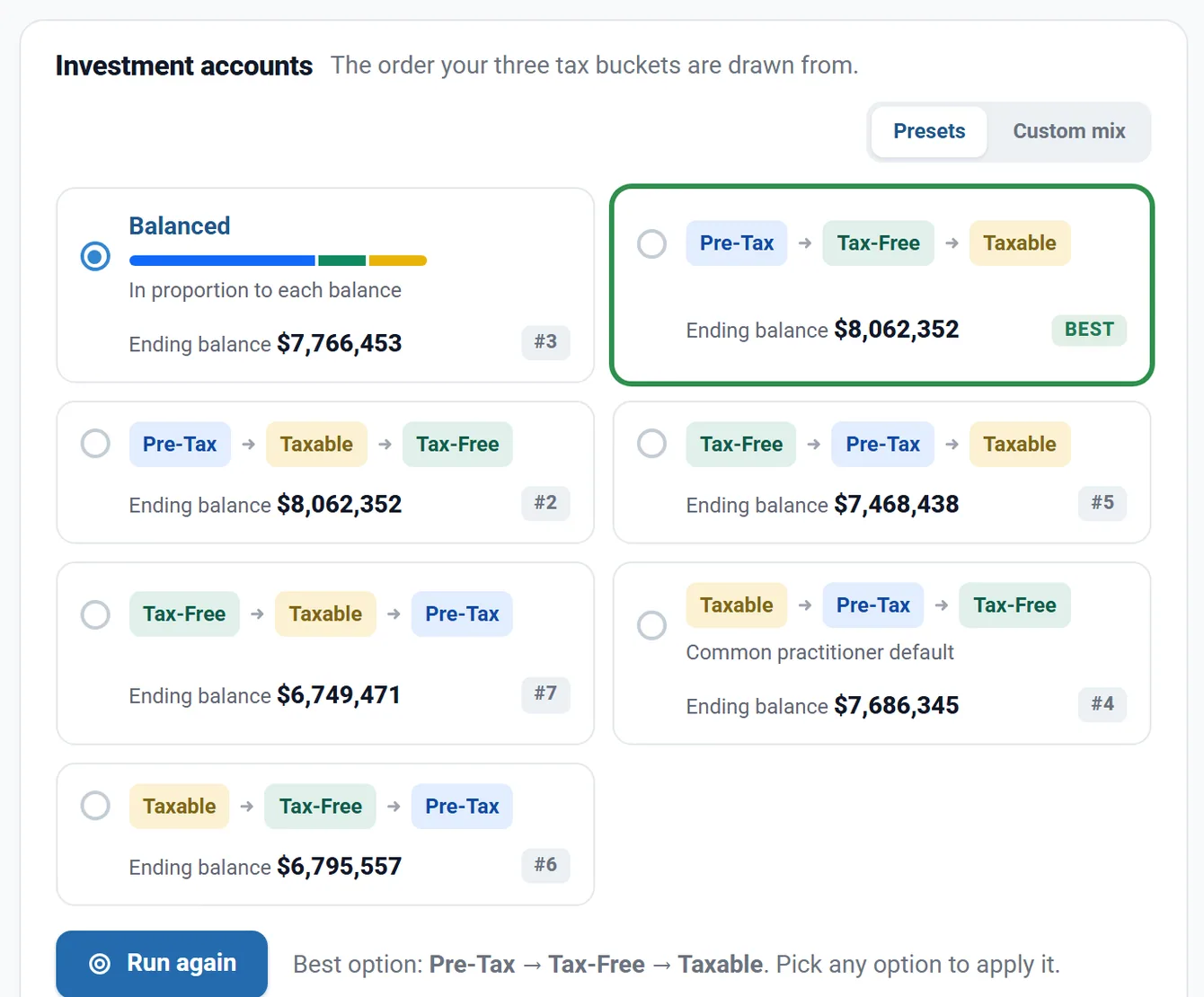
For Chris and Jamie, drawing pre-tax money first shows an ending balance about $300,000 higher than Balanced (the balances shown are before tax).
- Custom mix Planner+: three sliders (Taxable, Pre-Tax, Tax-Free) that add to 100%. Every withdrawal is split by them; when a bucket runs out, its share goes to the others. Find the Best Mix tests other splits. Going back to Presets keeps your sliders, and choosing Custom mix again uses them.
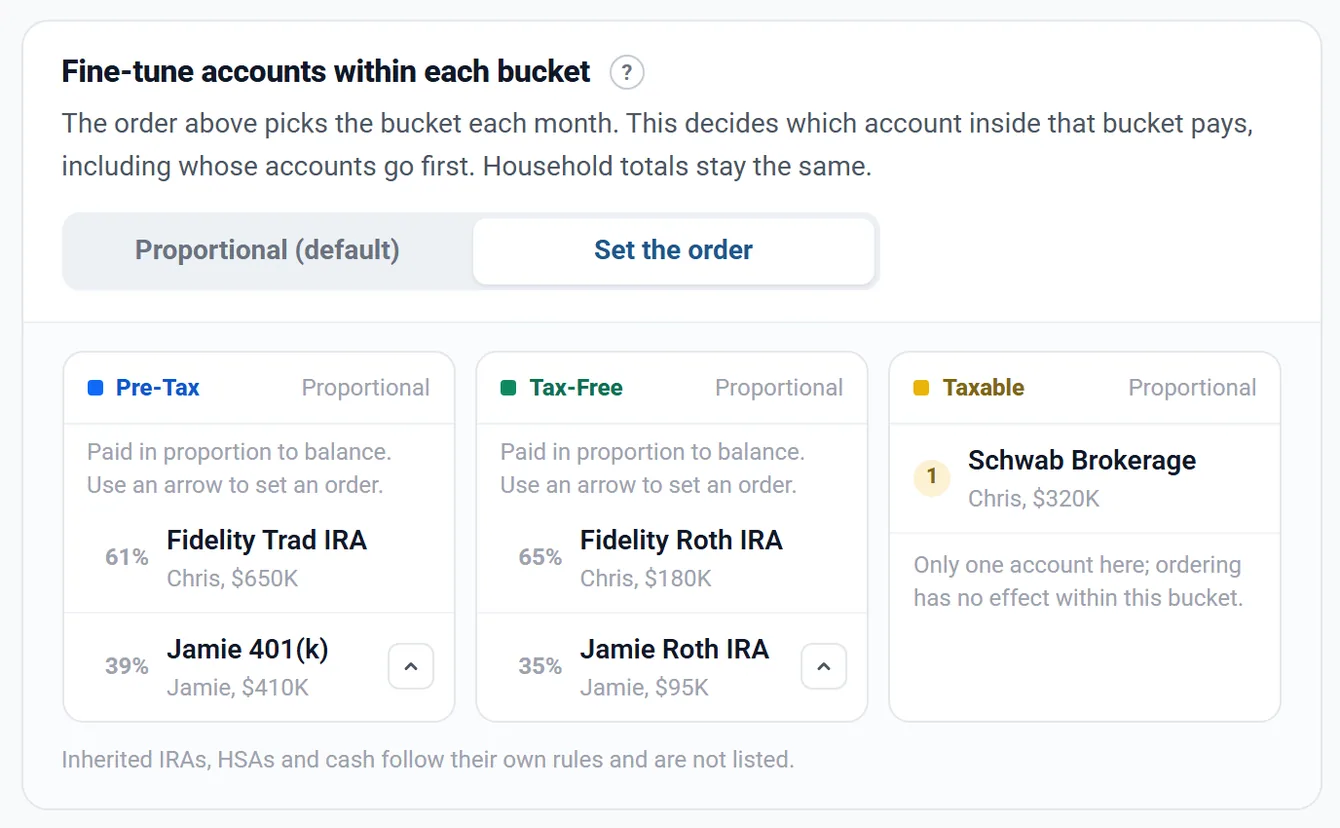
- Fine-tune accounts within each bucket (shown when a bucket holds two or more accounts): Proportional (default), or Set the order Planner+ to drain one account before the next. A bucket you have not reordered still pays in proportion to balance: it shows each account's share instead of a number, and an arrow gives it an order. Extra Withdrawals and Education Expense cards taken from a bucket follow its order too. Inherited IRAs, HSAs and cash follow their own rules and are not listed.
- On a Preview account, a custom mix, Custom amounts of cash or an account order already on your plan keeps working; changing it needs Planner+.
Spending your dividends. There is no separate switch to spend dividends instead of reinvesting them. A taxable account's dividends and interest are taxed every year and treated as reinvested in the account (see An account's Plan settings), so spending them is the same money as withdrawing that amount from the account. The order above decides which account that money comes from. On Balanced, a brokerage account pays about the same share of its balance as you withdraw from your savings overall, so it pays out about what it earns when that share is close to its dividend yield. A fixed order that starts with Taxable draws it before your other accounts. A withdrawal counts as a sale, so the gain in it is taxed as a capital gain; a dividend you spend directly involves no sale. To see the two side by side, the Income chart draws a dashed Interest & Dividends Earned line beside what each account paid out, and the Retirement Year Detail has a note under Portfolio Withdrawals.
Whose accounts are used first
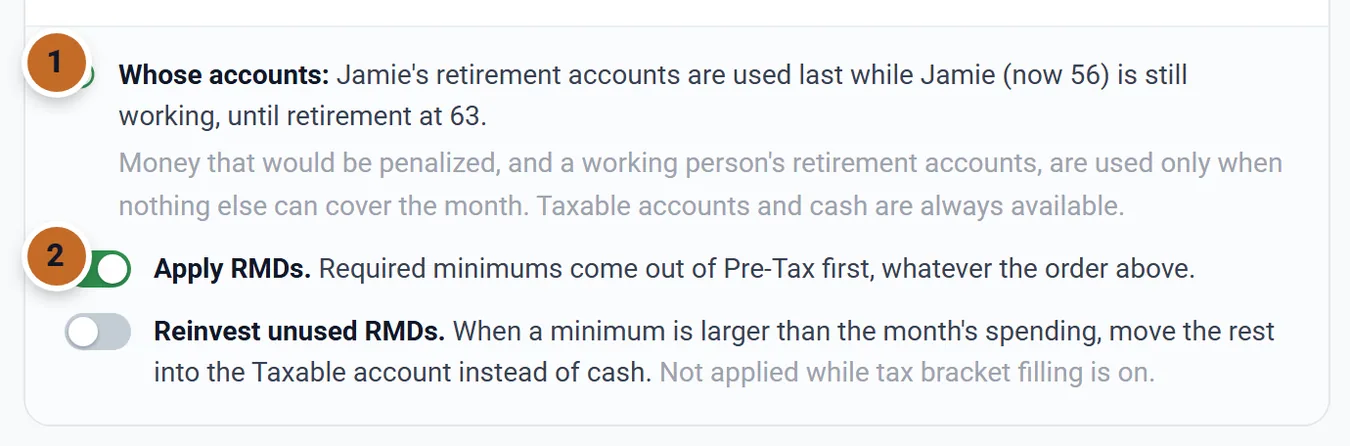
This is automatic, with Pick a strategy and Build my own. Within each step the plan uses money you can reach without a cost first: cash, taxable accounts (whoever owns them), and the retirement accounts of someone who has retired.
- Someone still working: their pre-tax and Roth accounts are used only when nothing else can cover the month, until their own Retire at age. Jamie's accounts are not touched while Chris is retired and Jamie works, to 63.
- Under 59½ US: pre-tax money and Roth earnings wait too, because of the 10% penalty (Roth contributions do not). This follows Apply the 10% early-withdrawal penalty to pre-59½ withdrawals in the Taxes box, which is on by default. For a 401(k) or 403(b) left at 55 or later, tick Rule of 55 applies to this account on the account. A 457 Plan never carries the penalty, at any age, with nothing to tick.
- Used last, not never: if nothing else can pay the month, protected accounts are used, the retired person's penalized money first. Required minimums are always taken.
Required minimums, and the money you do not spend
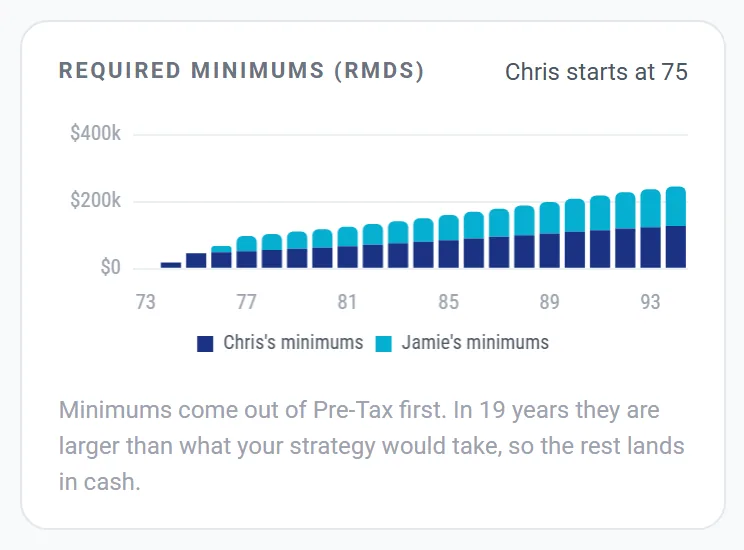
US Required minimum distributions start at 73 if you were born from 1951 to 1959, and at 75 if you were born in 1960 or later, each person from their own pre-tax accounts. Chris and Jamie both start at 75.
- Minimums come out of pre-tax accounts first, whatever your order. The switch is Apply RMDs, on by default.
- While you still work, your IRAs pay their minimum on schedule. A 401(k), 403(b) or 457 can wait until the year you retire, when it pays a full year; if you are self-employed, it starts on schedule too.
- A minimum larger than the month's spending is still withdrawn and taxed. What is left lands in cash; for Chris and Jamie that happens in 19 years.
- To invest it instead: Reinvest unused RMDs (Build my own only; it moves the rest into the taxable bucket, not while tax bracket filling is on), or Invest it in a brokerage account (with either choice, into the account you pick).
The Learning Library article Required Minimum Distributions explains when yours start and what you can do about them, with your plan's own numbers.
Tax moves come first
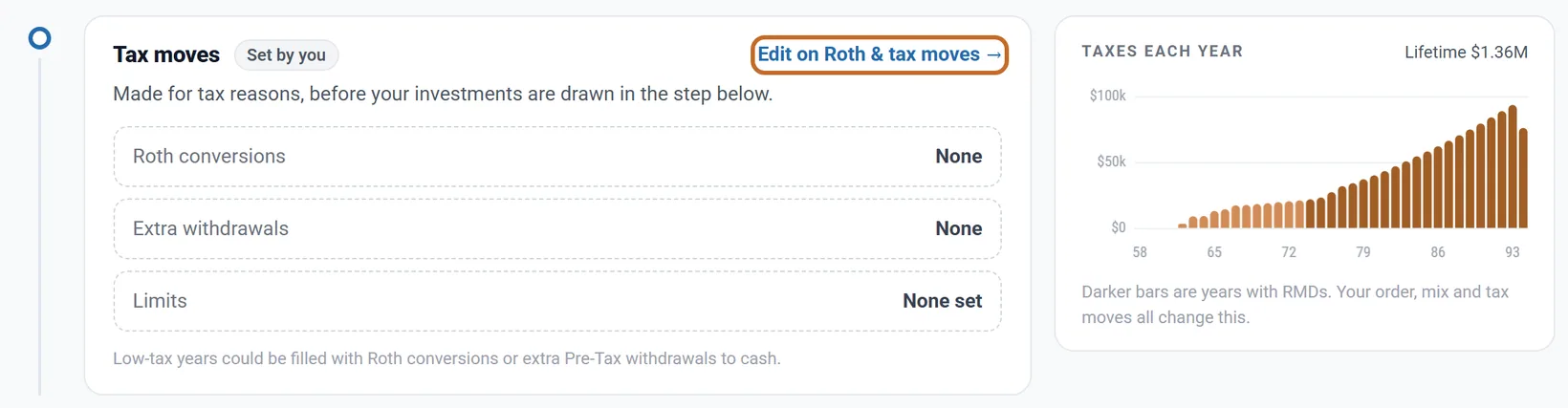
Roth conversions and extra Pre-Tax withdrawals that fill a tax bracket are set on Roth & tax moves, the second page of the Withdrawals tab (see Roth conversions and tax strategy). On Withdrawal order, the Tax moves card shows them in words ("Made for tax reasons, before your investments are drawn in the step below."):
- Three rows: Roth conversions, Extra Pre-Tax withdrawals and Limits. A US plan with no Roth account has no Roth row; in Canada and the UK there is no Roth row either, and Bracket filling takes the place of Extra Pre-Tax withdrawals.
- A label saying who set them: Set by you, From the Optimizer with the date, or From the Optimizer, edited by you.
- Edit on Roth & tax moves → opens the page that changes them. The card itself only shows them.
- When a limit holds a fixed or year by year conversion back in some years, the card says how many years convert less, or that the conversions do not happen.
The same rows are in the Withdrawal Strategy box (see Pick a strategy or Build my own). They apply with Pick a strategy and with Build my own.
- When extra Pre-Tax withdrawals fill a tax bracket with Monthly Expenses, the plan does not spend cash first in those months: it withdraws the month's whole need from your accounts, and the extra builds up in cash, or goes to your brokerage account if you chose that under DEPOSIT TO or chose Invest it in a brokerage account.
- With Monthly Income, your income and cash pay for spending first and the extra comes on top: its after-tax dollars first put back any cash your spending used that month, and the rest goes to your brokerage account, or stays in cash if you have none. With the 4% Rule or withdrawals on top of income, the extra's after-tax dollars go to your brokerage account, or stay in cash if you have none.
- While the tax moves steer withdrawals, the Tax moves card says so and offers Use my strategy instead. Find the best option and Find the Best Mix still compare, because your strategy still decides how the rest of the money is drawn. With Monthly Expenses, the Investment accounts card says "While extra withdrawals fill your bracket, Pre-Tax pays first and Tax-Free covers the rest, so Taxable is not drawn. Your strategy below takes over when the Pre-Tax money runs out." With Monthly Income or the 4% Rule it says "Filled first by the tax moves above; your strategy below splits the rest."
- A Roth conversion is a move into your Roth, not spending.
Take a set amount from one account
Use Extra Withdrawals (Add > Expenses > Extra Withdrawals, one card for each). It is extra spending on top of your regular spending. To move money between your own accounts instead, use Transfers.
- Name it, set Start age and End age (Chris's ages; the end age is included) and the Amount.
- Open More options for Lump sum once per year and its Month. If you start at your age today and that month has passed this year, the first one comes next year.
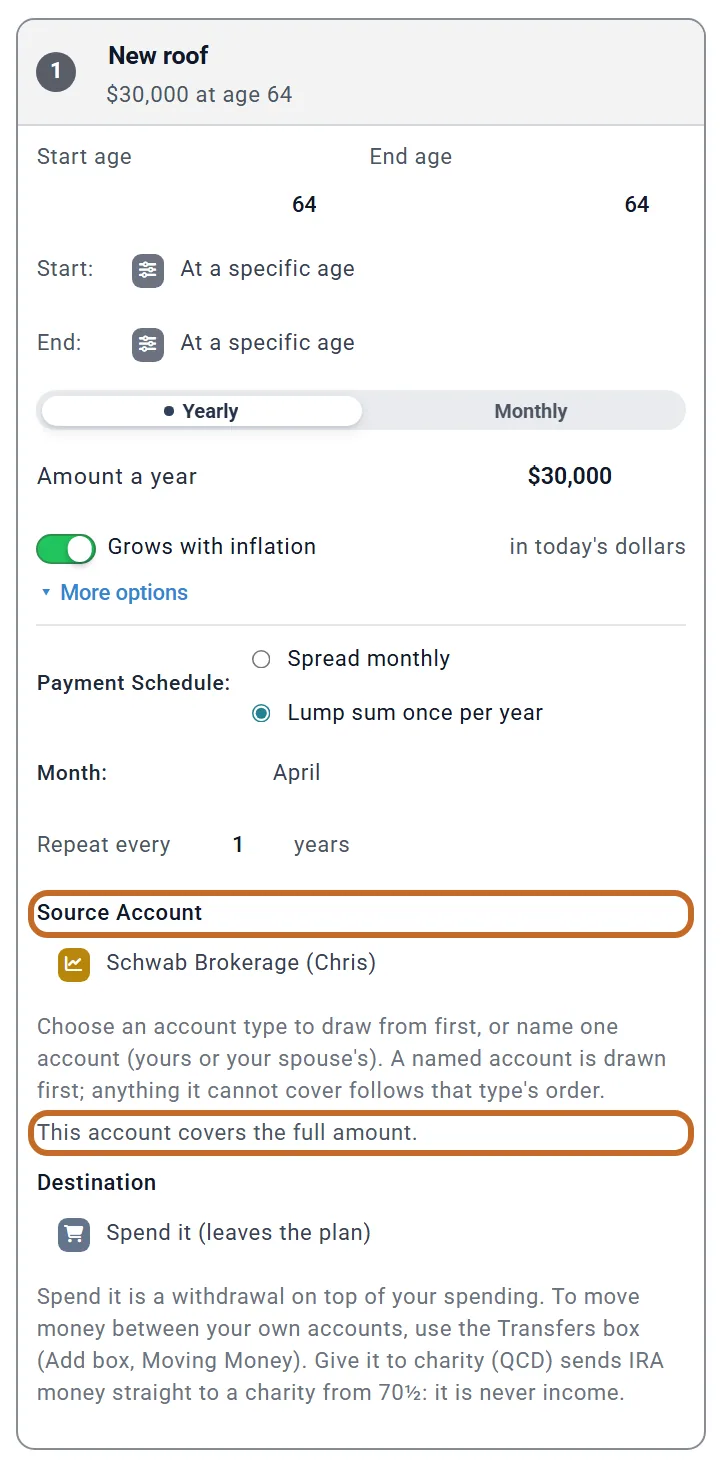
- Pick the Source Account: Auto, an account type first, or one of your or your spouse's investment accounts.
- Leave the Destination on Spend it (leaves the plan) (in the US you can also give it to charity from an IRA, a QCD).
A named account pays first; a line under it says whether it covers the amount, and anything it cannot cover comes from your other accounts. Here a new roof at 64, $30,000 in today's dollars ($36,816 when it is paid), comes entirely from Schwab Brokerage.
- Auto (cash, then your withdrawal order) takes cash above your minimums first, then follows your withdrawal strategy: an order such as Taxable, then Pre-Tax, then Tax-Free uses up one kind of account before the next, a custom mix splits the rest by your mix, and Proportional takes each kind in proportion to its balance. Inside each kind, an account order you set on Withdrawal order decides which account pays. By balance (cash, then all accounts) always takes every account in proportion to its balance. Neither follows your cash choice: to keep cash out, pick an account type or an account.
- With Grows with inflation on, as on a new card, the amount is in today's dollars and rises with prices; off, it is in the dollars of the year it is paid (see Spending and your budget).
- It is taxed like any withdrawal from that kind of account, including the 10% penalty on pre-tax money before 59½ (US).
- When a card draws retirement money before 59½, the card itself says so after each run: a line headed Early withdrawal penalty gives the dollars and the ages. The Coach and the alerts under the Dashboard chart say it too, for example "Extra Withdrawal 1 (New roof) triggers early-withdrawal penalties". Draw it from a taxable account, or start it at 59½, to avoid it (US).
- There is no way to say "pay my regular spending from this account": the nearest tools are your strategy, the account order within a bucket, Custom amounts from cash, and Extra Withdrawals.
Move money between your accounts
Use Transfers (Add > Moving Money > Transfers Between Accounts, one card for each) to move money from one of your accounts to another: an IRA or 401(k) into your brokerage account or into cash savings, a Roth into a brokerage account or cash, a brokerage account into cash, a rollover between your own accounts of the same kind, or your cash savings into a brokerage account or a 529 plan on a schedule. The money stays in your plan, so it is not spending.
- Name it and pick From: Cash savings, or one of your or your spouse's IRA, 401(k), Roth or brokerage accounts.
- Pick To: Cash savings; the same person's other account of the same kind (marked "a rollover" when it leaves an IRA, 401(k) or Roth); a brokerage account when the money leaves an IRA, 401(k) or Roth, or your cash; or a 529 plan US from any of them.
- Enter the Amount. With Grows with inflation on, as on a new card, it is in today's dollars. Or choose All of it (below).
- Choose Once (an age and a month), Every year (from one age to another, in a month or spread over the year), or At retirement (once, in the first month the account's owner is retired). The ages are those of the person whose account the money leaves (yours for cash). Spread over the year, the card also offers the last month it is paid in the final year: Through the whole year, or Through June and so on.
Saving from cash, for example into a grandchild's 529 US: choose Cash savings as From and the 529 as To, Every year from your age now to your age in the year the child turns 18, spread over the year, and the month of the 18th birthday as the last month. $3,000 a year spread is $250 a month. It is paid like your spending: from your cash above its minimum balance first, then from your savings in your withdrawal order, each dollar taxed as the account it comes from is (cash is not taxed). The 529's balance grows by each deposit. A 529 is offered as To only, and set to Education expenses only it is never spent on anything but your Education Expense cards (A 529 kept for education). If the same money is also a row in your budget, remove the row, or the plan counts it twice.
Handing a 529 to the student US: when you give the account to the grandchild (for example at 18), choose the 529 as From. Its only To is The student (hand the 529 over). With All of it and Once at your age in that year and the birthday month, the whole 529 leaves your plan that month: it is not taxed (the account changes hands; nothing is sold), it stops growing in your plan, and your savings and net worth no longer count it. This works on a 529 set to Education expenses only. After the plan runs, the card says what it handed over, for example "Hands over $43,580 in June 2032, not taxed", and Cash Flow shows it as "529 Handed Over". A contribution paid in that same month reaches the 529 the month after (every deposit does), and the plan hands that over too; so does anything paid into the 529 later.
Emptying an account over a few years, for example selling a Roth Crypto IRA into another Roth IRA or into cash, works two ways:
- Every year with an amount and Until it's empty: the amount moves each year from the first age, and in the year the account holds less than that, what is left moves and the transfer ends. The card names that last move, for example "The last move, $8,774 in January 2032, empties Crypto Roth".
- All of it with Every year from one age to another: each year moves an equal share of what is left (what the account holds then, divided by the moves left), so the account is empty after the last one whatever its returns. Four years move about a quarter, then a third, a half and the rest.
- All of it made once moves the whole account in one month.
- It is taxed the way the account it leaves is taxed. Money from a pre-tax account counts as income that year and, before 59½, carries the 10% additional tax unless an exception applies (US). After your required minimums begin, it counts toward that year's minimum. A Roth is tax-free from 59½. Selling a brokerage account to cash taxes the gain.
- It moves only what the account holds and never takes money from another account. After each run the card says what moved and when, for example "Moves $54,381 in June 2029". If the account will hold less than the amount (what it holds then, with its growth and contributions, not today's balance), an amber Can't move all of it note says how much it can move, with a button to use that amount, and a warning sign shows in the box's title bar. Typing more than the account will hold for a transfer made once lowers the amount to what it can move, and the card says so. If a change on the Accounts page (a lower balance, a deleted account) stops a transfer from moving in full, a message says which transfer and why.
- Some transfers cannot happen, so the plan does not offer them or does not make them, and the card says why: retirement money between two people, pre-tax money into a Roth (that is a conversion), a rollover into a 457 plan, money out of an IRA while its 72(t) payments run, and money out of an account you have set as not available for withdrawals. Before 59½ the card names the 10% additional tax and, after the run, how much it is, or the exception that removes it (the Rule of 55, a 457 plan). Taking money out of your current employer's 401(k) or 403(b) while you still work there is usually not allowed before 59½; the card reminds you, since the plan cannot know which employer the account is with.
- The money lands in the brokerage account, the 529 or cash the next month. Into a 529 from another account it is always withdrawn (or sold) and taxed first, then put in, never moved as it is.
- A rollover between your own accounts of the same kind (a 401(k) into an IRA, a Roth 401(k) into a Roth IRA, one brokerage account into another) moves the money as it is: nothing is taxed, there is no 10% additional tax, and it does not count toward a required minimum. It is not offered into a 457 plan, and the plan does not move money into or out of an IRA while its 72(t) payments run, or out of an account you have set as not available for withdrawals; the card says so.
- Moving pre-tax money into a Roth is a Roth conversion: use the Roth Conversions box. Paying a loan off early is not a transfer: use the loan's own Extra payments toward principal, whose Paid from can name the account that pays it (Paying a loan off early).
Your withdrawal rate, year by year
Your withdrawal rate is what your savings paid in a year (spending, the costs beside it and the taxes, less your other income) divided by your savings at the start of that year. Savings means cash, investments, HSAs and inherited IRAs, not your home. A required minimum you did not spend, and a Roth conversion's tax, do not count.
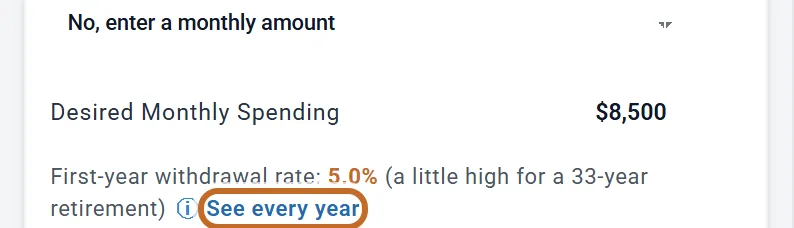
The Retirement Spending box shows your first year under the amount: Chris and Jamie's is 5.0%, "a little high for a 33-year retirement". The range it is judged against moves with the length of your retirement. See every year opens the chart. The overview on the Withdrawals tab shows the same first-year rate, with the middle year's and the highest (see The Withdrawals tab).
The chart (Dashboard, More > Withdrawal Rate) Planner+ shows every year against the 4% guideline and the rate that would last the years left, with a summary underneath.
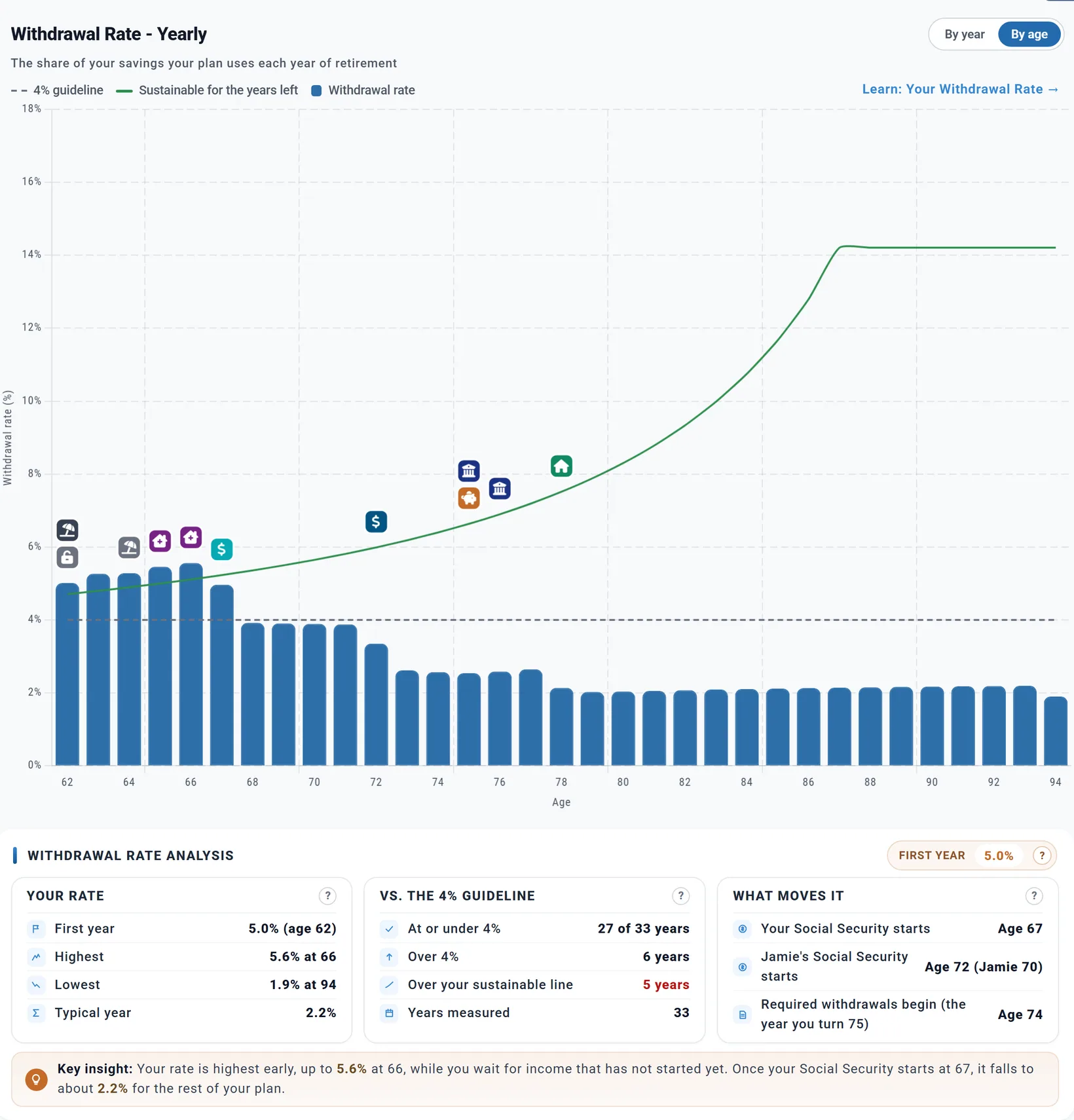
Their rate is highest in the years before Social Security starts (Chris's at 67), and is about 2% in the later years.
Before you retire. When your plan models your working years' spending (Employment Income with a budget or a monthly amount) and your pay does not cover it, as when one of you has retired and the other still works, the chart starts with those years too, in lighter bars: what your savings paid, with your pay counted as income. Only the years that draw on savings without a break up to your retirement show, and the summary lists them as While working. Your first retirement bar is still the first-year rate in the Retirement Spending box.
The Learning Library article Your Withdrawal Rate explains where the 4% comes from, and why your rate is supposed to move. Its chart draws the working years in lighter bars too; its first-year, highest and typical figures count retirement only. Learn: Your Withdrawal Rate → at the right of the chart's legend opens it. On Charts & Data the chart has no summary underneath, so a line above it gives the first-year, highest and typical rates and the same link.
Before 59½: 72(t) payments US
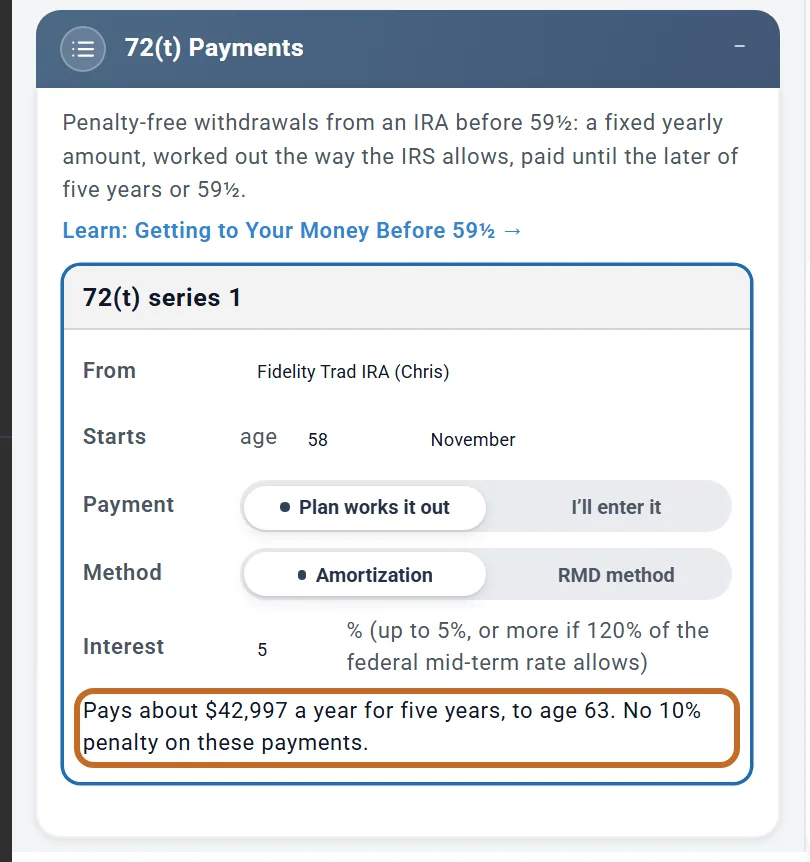
A 72(t) series takes a fixed yearly amount from an IRA before 59½ with no 10% penalty, until the later of five years or 59½. Add it from Add > Tax Planning > 72(t) Payments (up to two series). Planner+
- From: a traditional, rollover or SEP IRA of either of you.
- Starts: the owner's age and month, on or after their retirement and before 59½.
- Payment: Plan works it out, with the Method and Interest rate, or I’ll enter it (for a series already under way).
The payments count as income; what you do not spend lands in cash. While the series pays, the IRA is locked: no other withdrawals, Roth conversions or Extra Withdrawals from it.
The Learning Library article Getting to Your Money Before 59½ covers the 10% penalty, the other ways around it, and where your plan stands.
See it on the charts
On the Dashboard, the Withdrawals chart Planner+ shows each year's withdrawals by source: From Cash, RMDs, each kind of account, the HSA for health care, and one band for each Extra Withdrawal. Its choices above it switch between Per bucket and Per account.
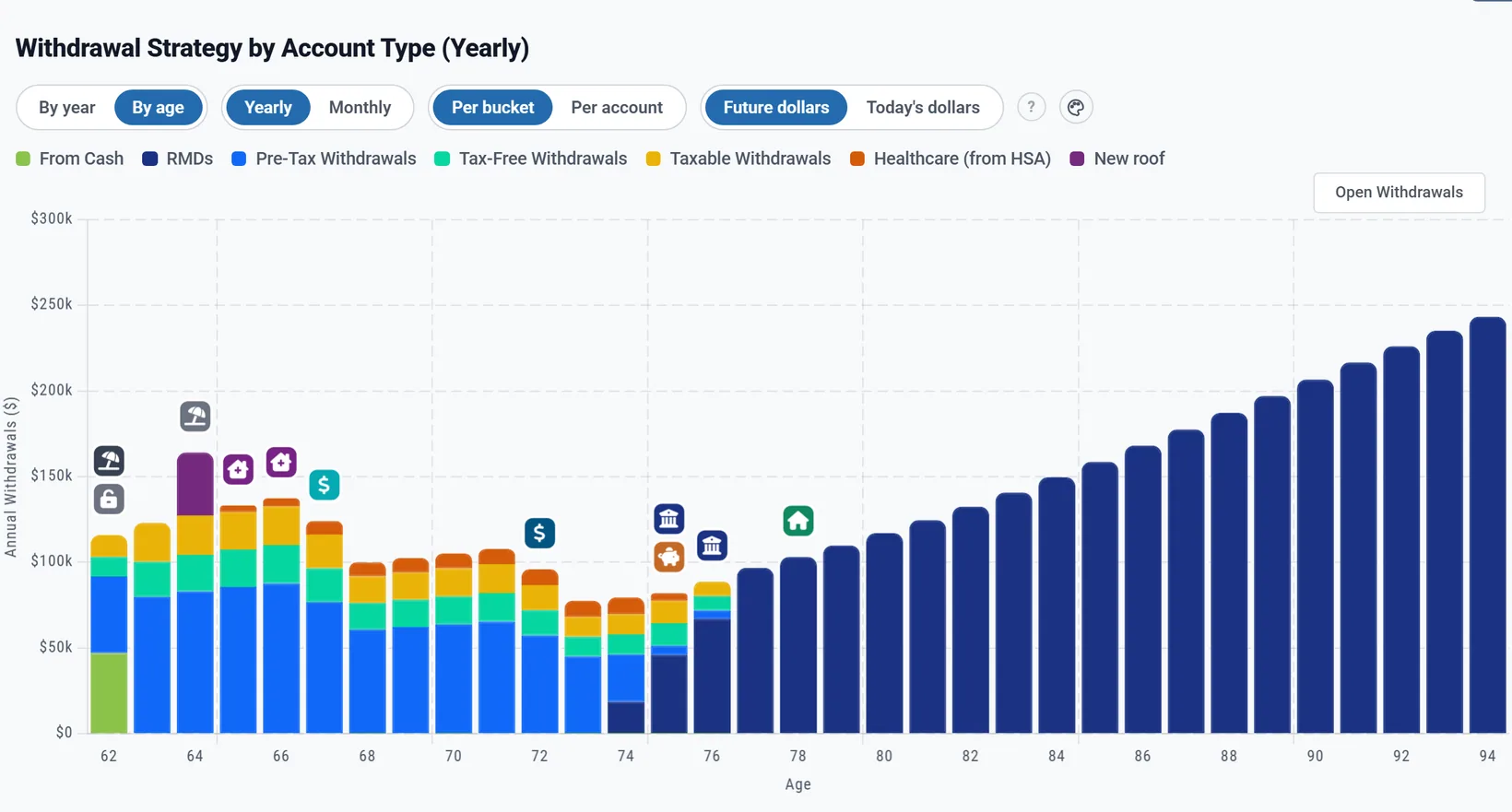
- Open Withdrawals, above the chart, opens Withdrawal order. Its overview and the charts beside its steps tell the same story for your whole plan: your withdrawal rates, lifetime taxes, the balance at the end, withdrawals and taxes each year, required minimums and your cash over time, with each change since you opened the tab. Withdrawals each year there shows the same totals as this chart.
- More > Cash Balance Planner+ draws your cash and your safety net floor.
- In Per bucket, money a withdrawal pays as the 10% early-withdrawal penalty is its own band, Early-Withdrawal Penalty, and its tooltip says whose penalty it is. (US)
What the planner does not do
- You cannot choose which cash account pays: cash is one pool.
- You cannot tell the plan to pay your regular spending from one named account in certain years.
- Protecting a working spouse's accounts is automatic; there is no setting to pool or split them differently.
- If a 72(t) series would break, the plan prevents what it controls and warns you; it does not model the penalty recapture.
For the full list of what the planner includes and leaves out, see the Learning Library article What ReadyAimRetire Models.