



 Continue with Google
Which box: pension or annuity?
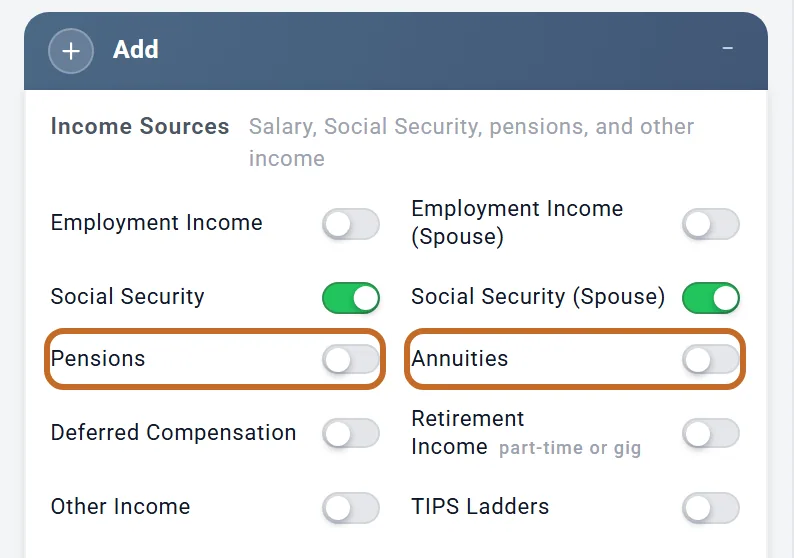
A pension and an annuity each pay you a set amount every month. In the planner each has its own boxes, which you switch on in the Add box under Income Sources. This page is the full reference; for a quick start see A pension and An annuity.
- Pension 1 and Pension 2: your pensions from an employer, a union or public service. They run on the Primary's ages.
- Pension 1 (Spouse) and Pension 2 (Spouse): your spouse's, on your spouse's ages. They appear once Include spouse is on.
- Annuities: one box with a card for each annuity you receive, plan to buy, or own and is still growing, up to two (Annuity 1 and Annuity 2). Both run on the Primary's ages, whoever owns the contract.
- Outside the US, Defined Benefit Pension 1 and 2 as well (see Outside the US).
So a couple in the US can enter four pensions and two annuities.
What does not go in these boxes:
- Social Security, and outside the US CPP / OAS, the State Pension or the Age Pension, have their own boxes.
- A payment that is not a pension or annuity, such as disability pay, alimony or a trust payment, goes in Other Income.
- An annuity inside an IRA or 401(k) that is still growing goes in the Annuities box too: choose Deferred and set Bought with to Pre-tax 401k/IRA. Its value then counts toward your required minimum distributions until it pays (see A deferred annuity held in an IRA).
- A pension that pays only until an age, or for a set number of years, still belongs in a Pension box (see How long it pays), not Other Income, so that state pension rules and the survivor share apply to it.
The Pension Planner page
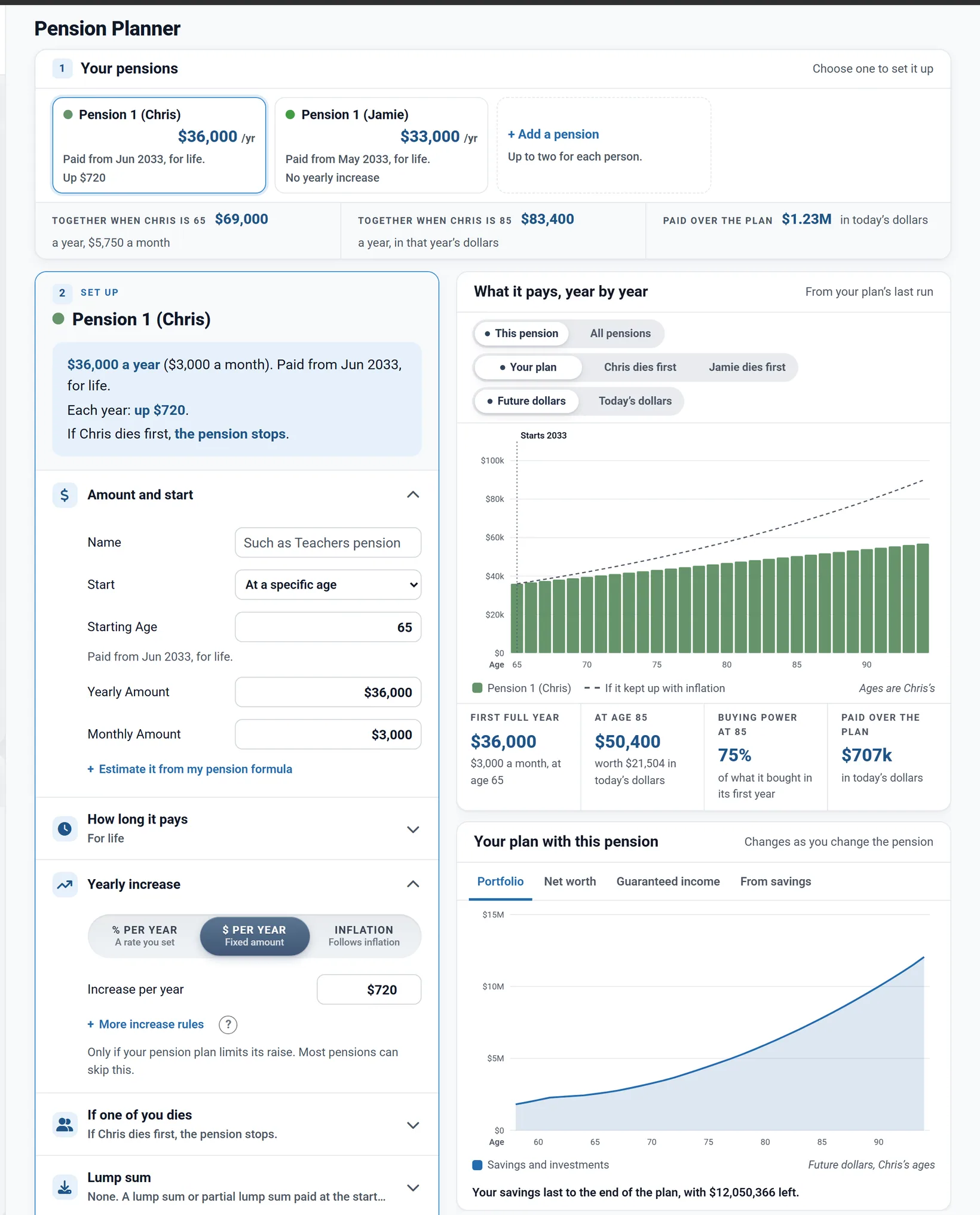
Your pensions share one Pensions box on the Dashboard. It lists the pensions you have added, and a new plan lists none. Press Add a pension for each one, and the Pension Planner page opens on the new pension so you can set it up; with a spouse in your plan there is a button for each of you, and each person can have two. A pension shows its Yearly amount, a few lines that say the pension in words, and the link Set up this pension.
Each pension has a switch and a delete button. Switch a pension off to leave it out of the plan and keep its settings: it stays in the box as one line, ready to switch on again. Press the delete button to remove it and its settings for good.
Every other pension setting is on the Pension Planner page. Press Open the Pension Planner at the bottom of the box, or Pensions in the icon menu on the left.
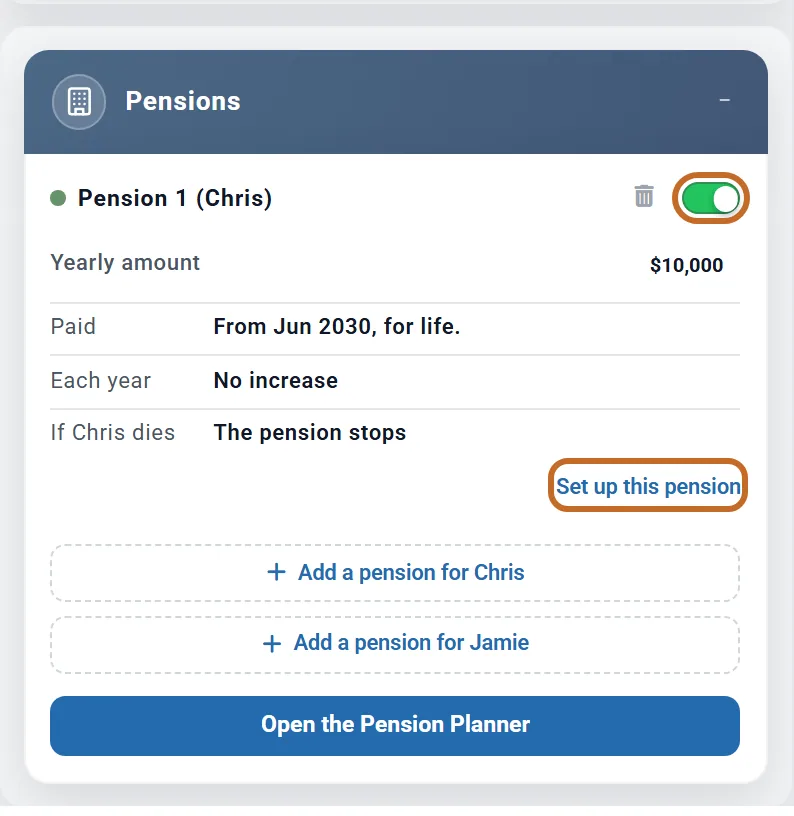
- Your pensions. A card for each pension that is switched on. Press a card to work on that pension. Under the cards are your pensions together: in the first full year, at 85, and over the whole plan in today's dollars.
- Set up. The pension in sentences, then six groups you open and close. A closed group
says in one line what it holds:
- Amount and start: a Name of your own for the pension (it then shows in place of "Pension 1" in the Pensions box, on this page and on the Pensions chart), when it starts, the yearly and monthly amount, and Estimate it from my pension formula (a multiplier for each year of service, your years of service, your final average salary, and a cut for starting early).
- How long it pays: for life, until an age, or a fixed number of years.
- Yearly increase: a percent, a dollar amount, or a share of inflation, with your pension plan's limits.
- If one of you dies: what your spouse keeps, a pop-up, and guaranteed years. Shown with a spouse in your plan. A note at the top says what your plan assumes today: that you are both there to the end, or whose Plan End comes first. Each setting is then marked "Used in your plan" or "Not used in your plan", because a share for your spouse is only paid if the pension's owner dies first, and a pop-up only if the spouse does. A setting that is not used is kept. The group starts closed for a new pension and stays open once you have set something in it.
- Lump sum: a lump sum, or partial lump sum, paid when the pension starts. The plan puts it in the owner's pre-tax accounts, as a rollover to an IRA would. It is not taxed then; it is taxed when you take it out. Enter the smaller pension that goes with it as the yearly amount.
- Taxes: After-tax contributions (money you paid in that was already taxed, which comes back tax-free in equal parts of each payment by the IRS Simplified Method) and This is a government pension. US
- What it pays, year by year. The pension from your plan's last calculation, in future dollars or today's dollars, for this pension or all of them. The dashed line is the first year's pension if it kept up with inflation, so you can see how much buying power a pension with a small raise loses. With a spouse in your plan, choose who dies first and at what age, and the chart shows what is paid from then on. Planner+
- Your plan with this pension. Under that chart, the rest of your plan from the same calculation, one chart at a time: Portfolio (your savings and investments, with a line saying whether they last to the end of the plan), Net worth, Guaranteed income (pensions, Social Security and annuities together) and From savings (what you take from savings each year). Change the pension and these change with it. Both charts stay beside the settings as you scroll, and are drawn shorter on a short window.
- Compare my pension options. Optional, and closed until you press its title or its arrow. Many employers' pensions give you a menu to choose from when you retire. With a spouse in your plan: type the amounts your pension plan quotes for each option (one life, 50% or 100% to your spouse, a pop-up, a lump sum, guaranteed years), and the planner runs your whole plan with each one. Nothing changes in your plan until you press Use this option. Planner+
Set up a pension
- Switch on Pensions in the Add box, then press Add a pension in the Pensions box. A pension is called "Pension 1 (Chris)" or "Pension 1 (Jamie)", after your names, until you give it a name of your own. Planner+
- The Pension Planner page opens on the new pension. The steps below are on that page. To come back to a pension later, press Set up this pension on its row.
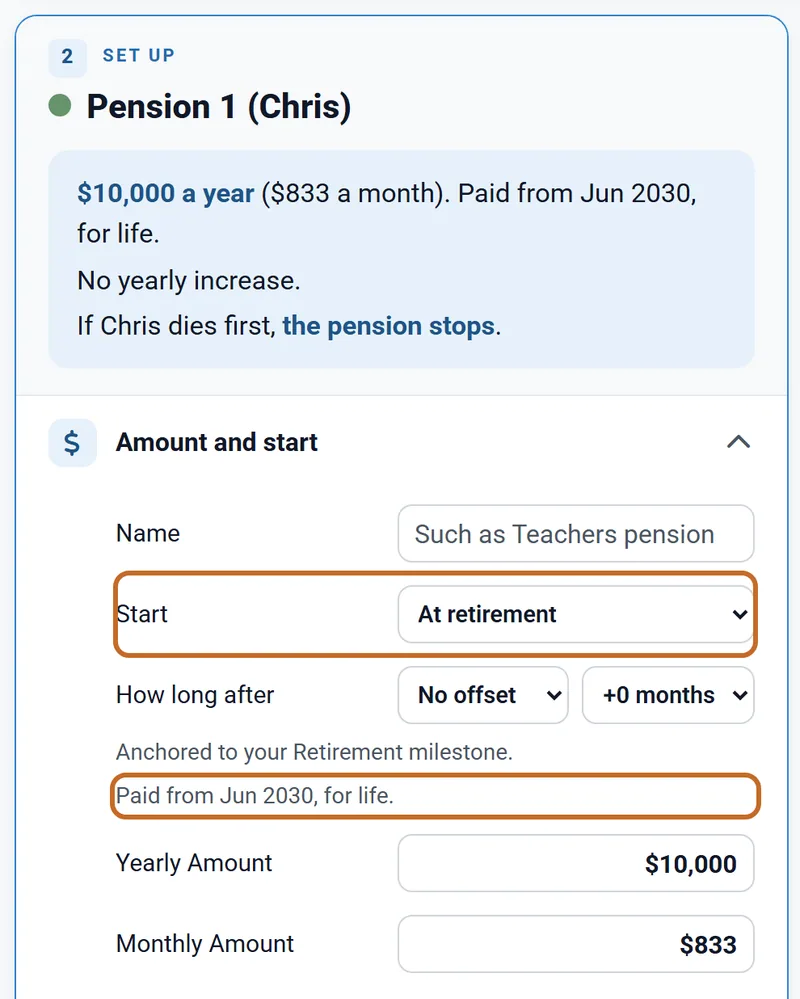
- Check when it starts. A new pension is set to start when you retire; choose another Start: or a Starting Age if yours begins at another time (see When a pension starts).
- Enter the Monthly Amount or the Yearly Amount of the first payment. They are one number shown two ways: typing one sets the other.
- Choose how long it Pays and how it rises each year.
- With a spouse in your plan, set Survivor Benefit (%). In the US, tick This is a government pension if it is one.
- Enter the first payment as it will be. The planner does not raise a pension before it starts. If your statement gives today's value for a pension that starts years from now, see Today's dollars, or the amount when it is paid?
- The pension's row in the Pensions box shows the yearly amount and says the rest in words: when it is paid, its yearly raise, and what your spouse keeps.
- The box's Do not count switch leaves it out of this plan and keeps its values (see Leave something out of one plan).
When a pension starts
With Start: on At a specific age, the first payment arrives in the owner's birthday month at Starting Age: Chris's for Pension 1 and 2, Jamie's for the (Spouse) boxes. A pension of Chris's that starts at 65 is first paid in June 2033.
Start at retirement or at a milestone
Start: also offers:
- At retirement: the Primary's first month of retirement, set by Retire at and Retire in. This is the Primary's retirement in every pension, your spouse's included.
- At spouse's retirement: your spouse's first month of retirement (shown when your plan has a spouse).
- Each of your age milestones, by name (see Tie other parts of your plan to a milestone).
Next to a retirement choice you can add years (+1 year to +10 years, or -1 year to -3 years) and months (+1 month to +11 months); next to a milestone, years only. A line confirms the choice, such as "Anchored to your Retirement milestone." with a Set age instead link, and Starting Age is greyed out because it is no longer used.
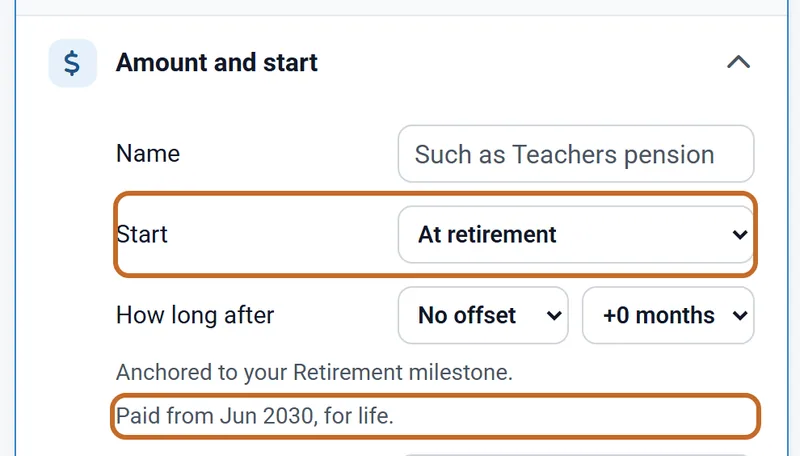
For Chris, who retires at 62 in June:
| Start | The line under Pays |
|---|---|
| At retirement | "Paid from Jun 2030, for life." |
| At retirement, -1 year | "Paid from Jun 2029, for life." |
| At retirement, +3 months | "Paid from Sep 2030, for life." |
| A milestone "Pension", Chris at 60 in September | "Paid from Sep 2028, for life." |
- The start moves with your plan: change the retirement age, the Retire in month or the milestone, and the pension follows. A milestone with a month, as above, starts a pension in a month other than the birthday month without tying it to retirement.
- If the milestone is deleted, or your spouse is taken out of the plan, the pension goes back to its Starting Age, and the line says "The anchored milestone no longer exists; the age below applies."
Your spouse's pension that should start when your spouse stops work uses At spouse's retirement. Worked example: A pension that starts after your spouse stops work.
A pension that starts before you retire
A pension can start while you are still working: any Starting Age from 40, a retirement choice with -1 year to -3 years, or an earlier milestone. What it does to your plan before the Primary retires depends on Employment Income:
- With Employment Income on, the pension is taxed with your pay and pays toward your spending. It adds to your savings only in the Left over after expenses saving mode, like any other extra income. For Chris and Jamie, $833 a month from today adds $11,699 of tax before Chris retires.
- With Employment Income off, the plan carries no spending and no tax before the Primary retires. The pension shows on your charts, but it is not taxed and does not reach your savings until you retire. The Pension Planner says so in a note.
See You keep working after your spouse retires for how the working years are modelled.
A pension you already receive
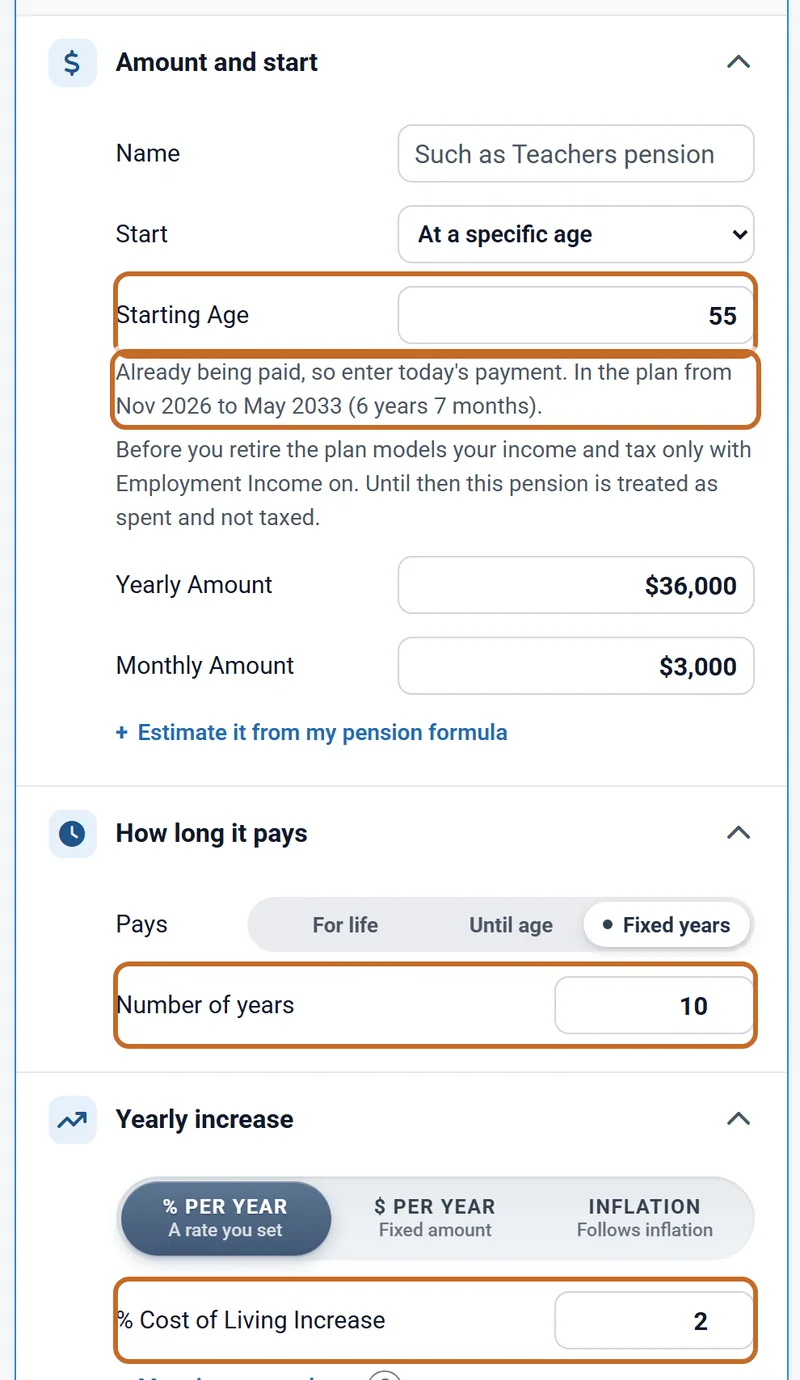
- Set Starting Age to the age it began (down to 40, for either of you).
- Enter today's payment, not the first one.
The plan pays it from this month. Its raises come on its own anniversary, and a Fixed years term counts the years already paid. The line says "Already being paid, so enter today's payment."
Here a pension Chris has received since 55, for 10 years in all, with 2% a year: "In the plan from Nov 2026 to May 2033 (6 years 7 months)." It pays $3,000 now and rises to $3,060 in June 2027, the anniversary of its start.
If you have already retired, a new pension starts at your retirement age, so it reads as already being paid: check the amount is today's.
How long it pays
Pays has three choices:
- For life (the default): to the end of your plan. If your spouse has a Plan End of their own, the owner's death applies the survivor share.
- Until age: a bridge or supplement, such as the US federal (FERS) supplement to 62, a Canadian bridge benefit to 65 or a UK bridging pension. Stops at age (40 to 100) is the owner's age; payments stop on that birthday, so the last one is the month before. It starts at the owner's Plan End age, so the pension pays to the end of the plan until you lower it to the age yours really stops.
- Fixed years: Number of years (1 to 40) of monthly payments, counted from the true first payment.
Here Chris's pension starts at retirement and stops at 65: "Paid from Jun 2030 to May 2033 (3 years)", 36 payments.
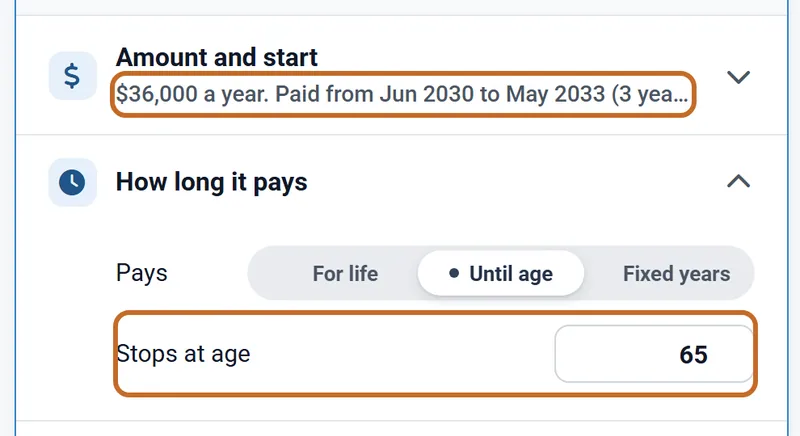
- A pension that drops to a lower amount at an age is two pensions: the lasting part For life, and the part that stops in a second box with Until age.
- A survivor share stops when the pension itself stops.
Yearly increases
Choose one of three kinds of raise:
- % per year ("Cost-of-living increase"): set % Cost of Living Increase, 0 to 5%. It compounds: 2% takes $3,000 a month to $3,060, then $3,121.20.
- $ per year ("Fixed amount, same every year"): set Increase per year in dollars a year. The same dollars are added each year: $720 a year takes $36,000 to $36,720, then $37,440.
- Inflation ("Follows inflation"): the pension rises with your plan's own inflation. Choose A share of inflation and set Share of inflation (%) (100 is all of it, 50 is half), or US federal (FERS) for the federal rule. Choosing the federal rule also sets the increases to begin at 62; change that under More increase rules if yours begin earlier.
The first raise comes 12 months after the first payment, and then every 12 months: on the pension's own anniversary, not in January.
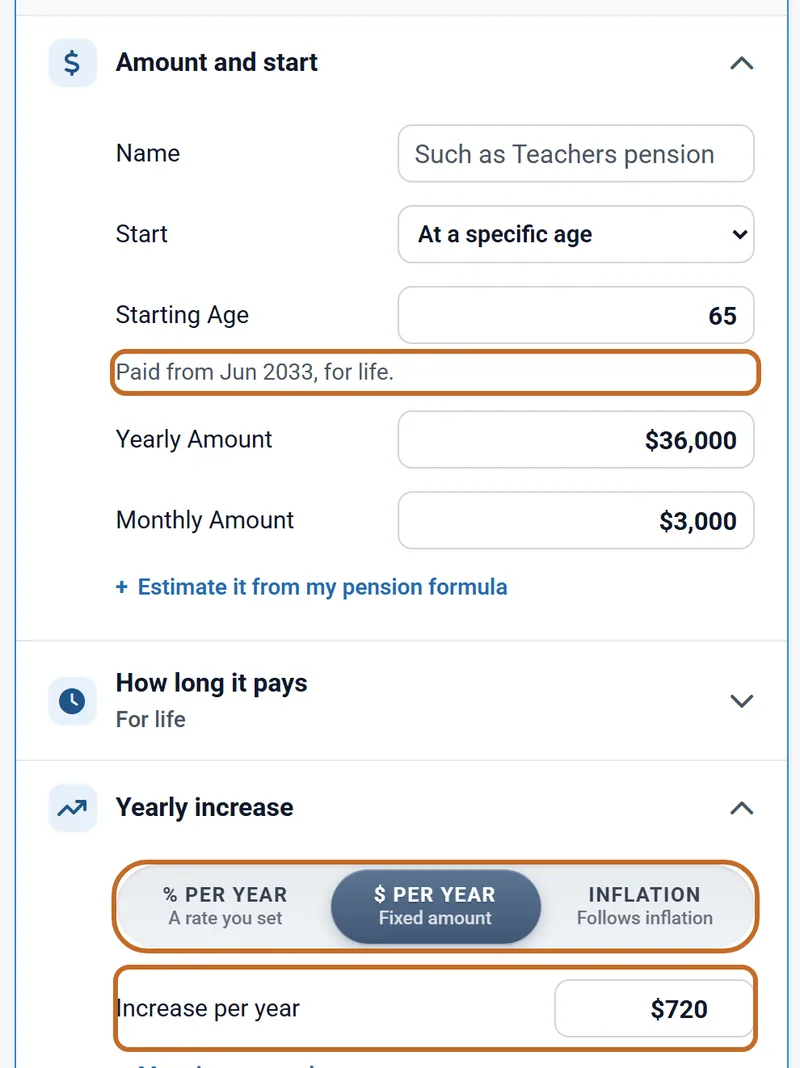
- Only Inflation follows the plan's inflation rate. The other two are the fixed percent or dollars you enter.
- More increase rules holds the limits many pension plans write into the raise: No less than and No more than a percent a year, Only on the first part of the pension, a raise worked on the starting pension (simple, it never compounds), and Increases begin at an age or after a number of years of payments. Leave a row at 0 to switch it off. The page writes the rule back as one sentence, such as "Each year: 50% of inflation, at least 1%, at most 3%, after 5 years of payments."
- A plan that gives a simple (not compounding) increase is a dollar raise: 2% of a $36,000 pension is $720 a year.
If the pension's owner dies first
Survivor Benefit (%) is the share of the payment your spouse keeps after the pension's owner dies: 0 to 100%, in steps of 5. It starts at 0%, which means the pension stops. It shows only while Include spouse is on.
It is used only when your spouse has a Plan End of their own. With the linked Plan End (the default), nobody dies in the plan and every pension pays to the end. See If one of you dies first.
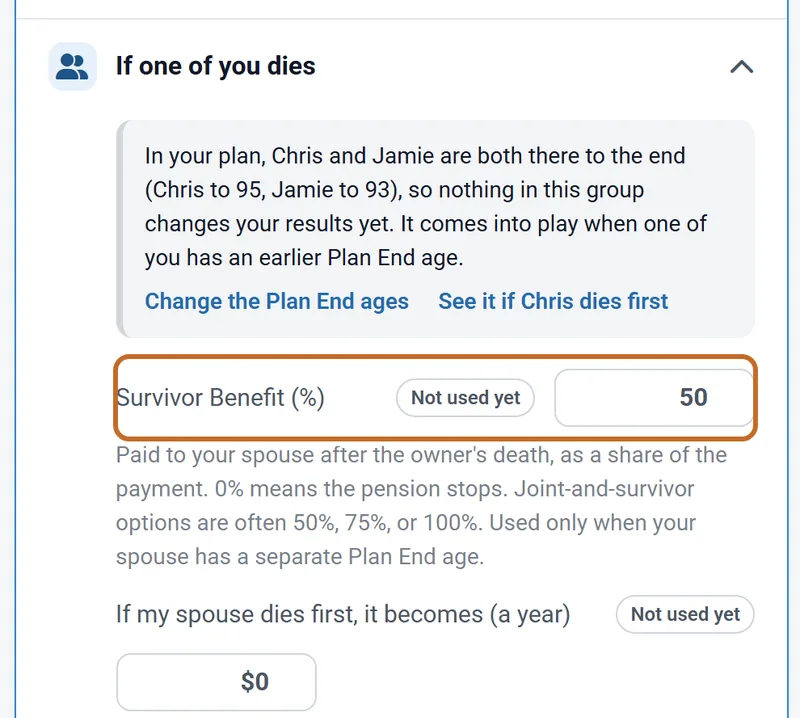
- Your own pensions use it when you, the Primary, die first; your spouse's pensions when your spouse dies first.
- From the death month the payment is multiplied by the share, and it keeps its raises. With Jamie's Plan End at 98, Chris dies first, in June 2063 at 95: Chris's $3,000 a month pension at 50% pays $1,500 from then on, and at 0% it stops.
- Annuities have no survivor setting: they keep paying after the first death.
A pension that goes back up when your spouse dies
Some pensions pay less while both of you are alive and return to the full amount if the spouse dies first. Enter that full yearly amount in If my spouse dies first, it becomes (a year), in the If one of you dies group of the Pension Planner. It shows once Survivor Benefit (%) is above 0. Leave it at 0 for no pop-up.
Guaranteed for (years) is a "period certain": if the owner dies within that many years of the first payment, the full pension keeps being paid until those years are up, and the survivor share applies after that.
Like the survivor share, both are used only when your spouse has a Plan End of their own.
How pensions are taxed
The planner works out the tax for you each year; there is nothing to enter in the Taxes box. No tax is withheld from the payments: it is part of each year's taxes. US
- Federal: every pension dollar is ordinary income. There is no taxable-percent setting on a pension.
- A pension raises your income, so it can also raise how much of your Social Security is taxed, your Medicare premiums (IRMAA) and, before 65, the cost of marketplace health insurance.
- No Social Security or Medicare tax, no 3.8% Net Investment Income Tax, and no 10% early-withdrawal penalty, at any age.
- State: your state's own pension rules apply. Some states leave out part or all of a pension by age or amount; California taxes it in full.
This is a government pension
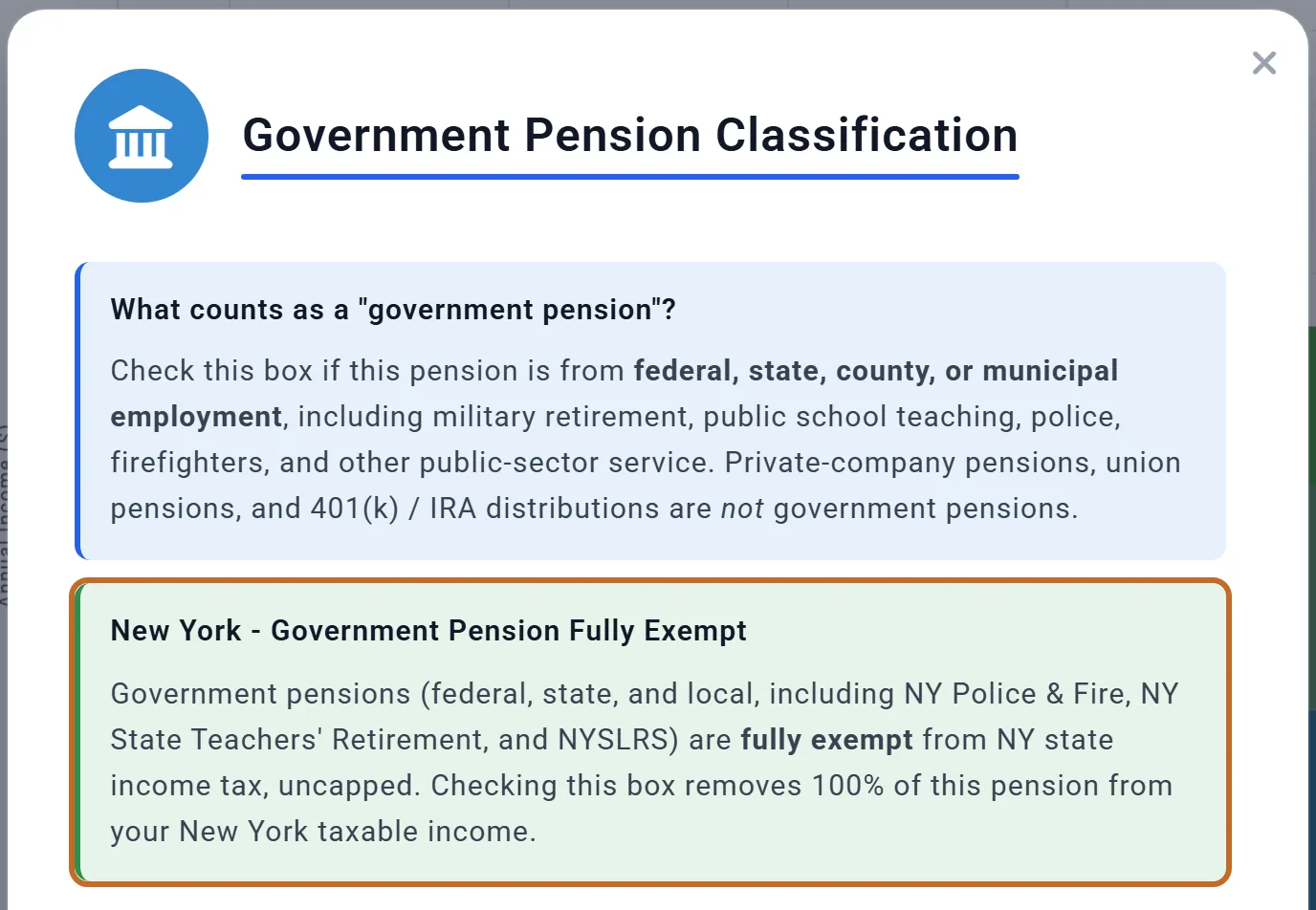
Tick This is a government pension for a pension from federal, state, county or city service, including the military, public school teaching, police and firefighting. It changes state tax only, and only in the states whose rules treat government pensions differently. For Chris's $36,000 pension at 67:
| State | What the box does | State tax saved at 67 |
|---|---|---|
| New York | Fully exempt, before the $20,000 exclusion for other pensions and IRAs | $1,949 |
| Massachusetts | Fully exempt | $1,875 |
| Louisiana | Fully exempt | $1,102 |
| Kansas | Fully exempt | $2,103 |
| Missouri | Exempt up to $48,967 (2026) per person, less that person's own Social Security deduction | $1,020 |
| Minnesota | A subtraction of up to $13,850 ($27,690 joint), phased out above $86,410 of income ($110,780 joint). Tick it only for service that did not earn Social Security. | $2,392 |
| Every other state | Nothing changes. Alabama, for example, already exempts every pension in these boxes. | $0 |
The "?" beside the box explains what counts and shows the rule for the state in your profile (Location).
- The planner cannot tell which state paid a pension. In Massachusetts, Louisiana and Kansas a public pension from another state is generally not exempt, but a ticked box exempts it anyway. Tick it only for a pension your state exempts.
- Local taxes still apply: New York City's tax, for example, still taxes a government pension.
- The box is shown in every country but does nothing outside the US. It does not change Social Security.
Set up an annuity: where is it today?
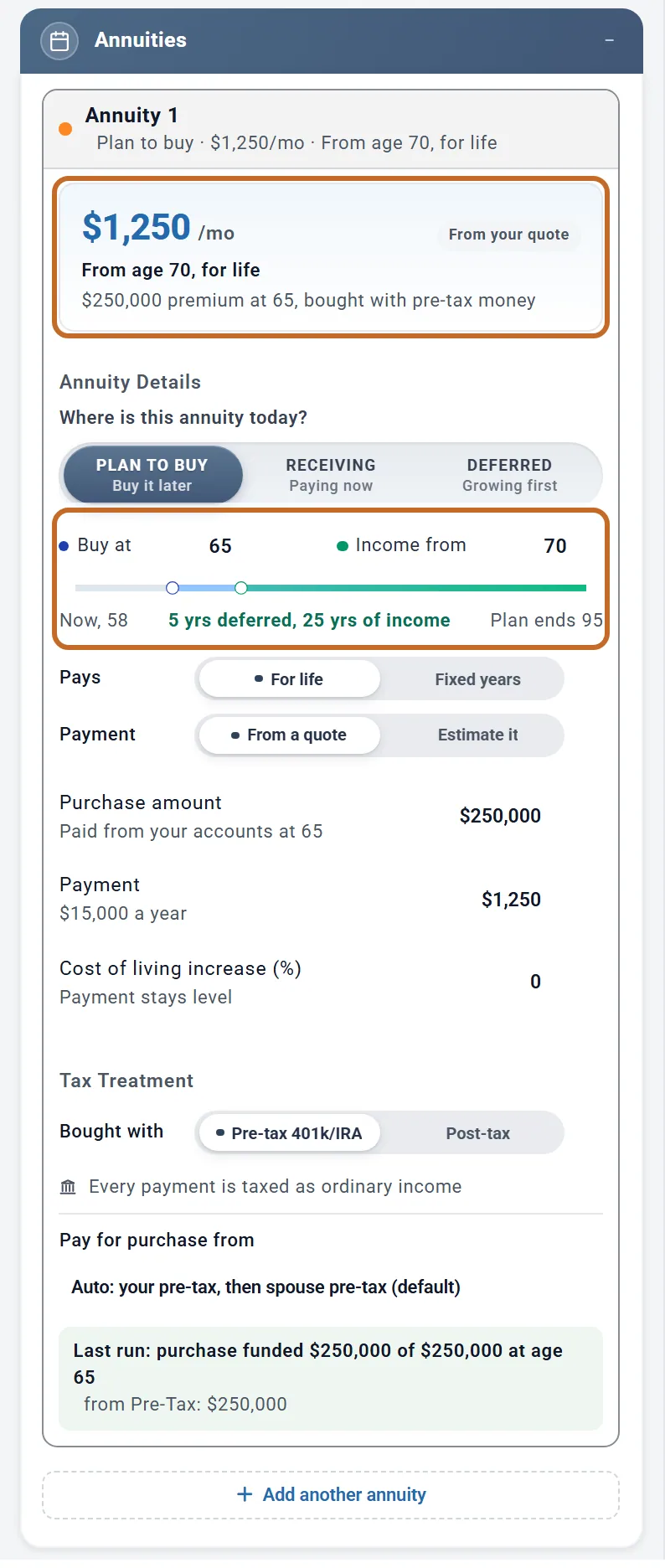
Switch on Annuities. Planner+ The box opens with a card for Annuity 1: a summary of the payment, then Where is this annuity today?:
- Plan to buy ("Buy it later"): the plan takes the premium from your accounts at the purchase age and pays the annuity from the income start age.
- Receiving ("Paying now"): nothing is taken from your accounts. Enter the payment from your contract and the age it starts.
- Deferred ("Growing first"): a contract that grows before it pays out (see A deferred annuity).
A second annuity: Add another annuity under the card adds Annuity 2. With two, one card is open and the other folds to one line, such as "Plan to buy · $1,250/mo · From age 70, for life"; press that line to open it. The bin on an open card takes that annuity out of the plan (its settings come back if you add it again). With one card, switch Annuities off in the Add box instead.
An annuity you already receive
- Income from: on the timeline, set the age payments began, or your age today, with the minus and plus buttons (they show when you point at the timeline) or by dragging the handle. The summary then reads "Paid now, for life".
- First payment, under the timeline: Birthday month, or the month your contract makes its first payment. With a month, nothing is paid before it: an annuity that starts paying in November of the year you turn 68 pays two months that calendar year. The note under the row names the month and year.
- Pays: For life (to the end of the plan) or Fixed years, with For 10, 15 or 20 years.
- Payment: the monthly payment, up to $8,333; the yearly total shows under it.
- Cost of living increase (%): 0 to 5%, a fixed percent compounding each year. At 0 the payment stays level.
- Under Tax Treatment: Bought with and, for a post-tax annuity, Taxable portion (%) (see How annuity payments are taxed).
Whose annuity? Annuities always run on the Primary's ages: the purchase, the start of payments and the timeline's "Now, 58". Enter a spouse's annuity on the Primary's ages. Payments start in the Primary's birthday month at Income from, unless First payment names a month: then the first payment is the first time that month comes at or after that birthday. The Dashboard's yearly bars run from birthday to birthday, so the first bar holds the months from the first payment to the next birthday; choose calendar years on a chart to see the payments by calendar year.
Buying an annuity in your plan
With Plan to buy, the box has:
- A timeline with Buy at (55 to 85) and Income from (never before Buy at).
- Pays, and Payment: From a quote (type the payment your quote gives) or Estimate it.
- Purchase amount, up to $1,000,000, and Cost of living increase (%).
- Under Tax Treatment: Bought with (the money's tax treatment), Taxable portion (%) for a post-tax purchase, and Pay for purchase from (which accounts pay).
The premium is taken in the Primary's birthday month at Buy at. A Buy at age already behind you buys the annuity in the plan's first month, and the box warns you; if you already receive the annuity, choose Receiving instead.
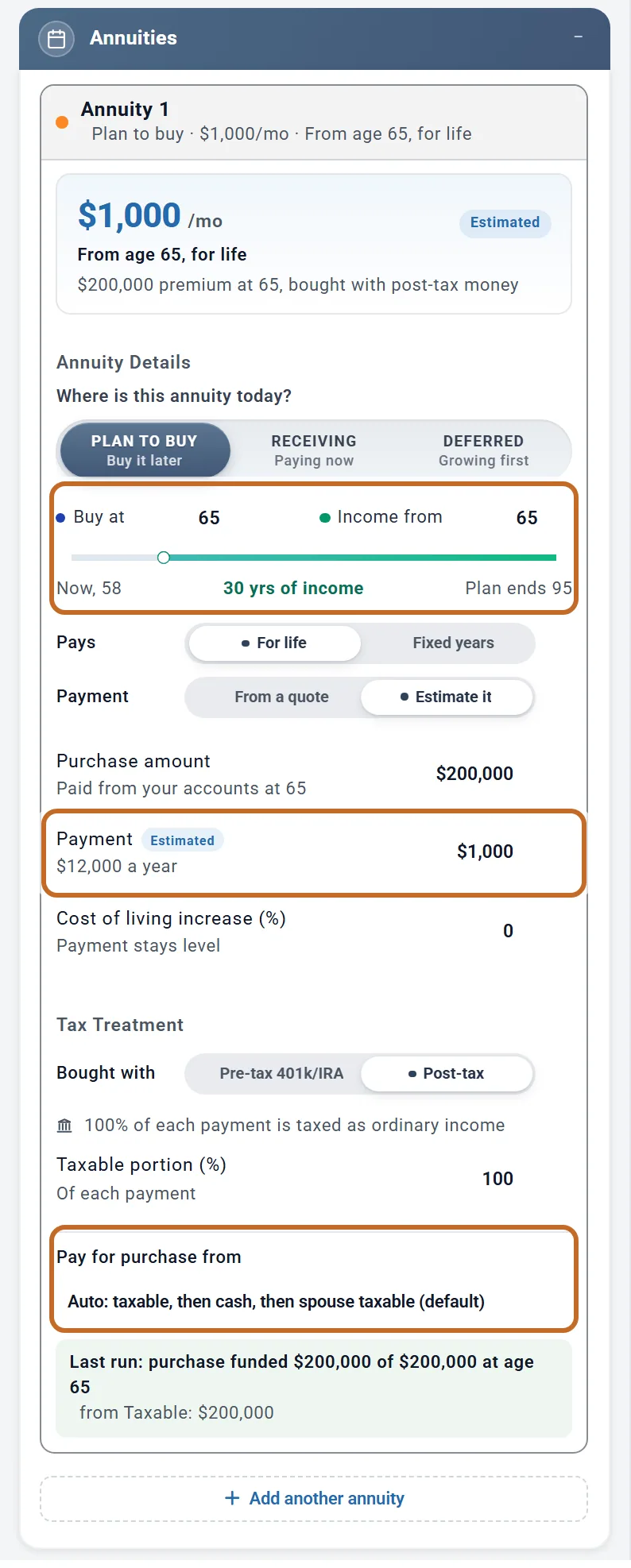
Estimate it works the payment out from the purchase amount with typical payout rates for the age payments start (6.0% a year at 65, 6.8% at 70, 7.8% at 75), 3% more for each year between buying and the first payment. The Payment row then shows "Estimated" and cannot be typed in. It is a rough guide, not a quote: here $200,000 bought at 65, paying from 65, is estimated at $1,000 a month ($12,000 a year).
Which accounts pay
- Bought with Pre-tax 401k/IRA: Pay for purchase from offers "Auto: your pre-tax, then spouse pre-tax (default)" or one pre-tax account. Buying inside an IRA or 401(k) is not taxed; every payment is.
- Post-tax: "Auto: taxable, then cash, then spouse taxable (default)", "All taxable accounts first", "Cash first" or one taxable account. Paying from a brokerage account sells holdings, so the gain in what is sold is taxed that year; paying from cash is not.
- Your chosen source pays first. If it runs short, the rest follows the default order. A pre-tax purchase is never paid with taxable money, nor the other way round, and Roth accounts never pay.
- The purchase leaves your cash safety net alone and skips locked accounts, such as an IRA paying a 72(t) series, unless you name that account.
If the money is short
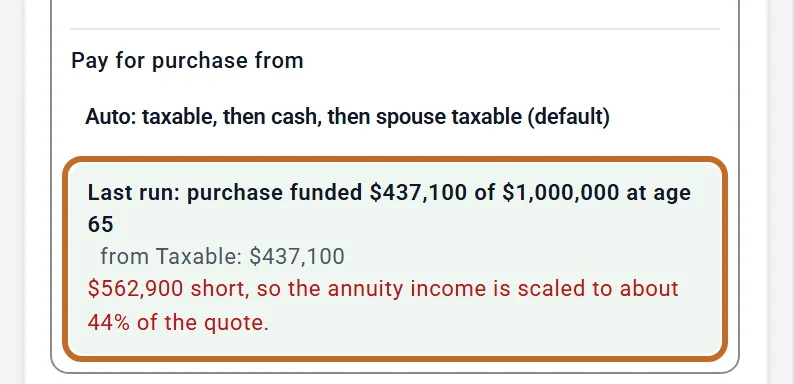
The plan buys a smaller annuity: the payment is scaled to the share of the premium it could pay. After the calculation the box says how much was paid and from where, and the plan's warnings add "An annuity purchase could not be fully funded".
For Chris and Jamie, whose cash is spent by 65, a $1,000,000 purchase at 65 can take only $438,626 from their taxable savings: "$561,374 short, so the annuity income is scaled to about 44% of the quote." The estimated $5,000 a month is paid as about $2,193. The summary at the top of the box shows the payment the plan makes, about $2,193 a month, and says it is about 44% of the full $5,000.
A deferred annuity that is still growing
Choose Deferred for a variable or fixed deferred annuity that grows before it pays out. Bought with after-tax money, outside an IRA, it is non-qualified (this section); held in an IRA, see A deferred annuity held in an IRA. Own it yet? asks whether you already own it.
- I own it: enter Contract value today, Premiums paid in (your cost basis, which comes back tax-free) and Growth rate (% a year), after the contract's fees. Nothing is taken from your accounts.
- I plan to buy it: a Purchase amount at Buy at, paid from your taxable accounts or cash (from your pre-tax accounts when it is bought inside an IRA). It becomes the contract's value and, bought with after-tax money, your cost basis.
- Take it as: Annuitize (payments from Income from, for life or 10, 15 or 20 years) or Withdraw yearly (withdrawals from Income from; the rest keeps growing).
- Amount (when withdrawing): Dollars, a Yearly withdrawal each year, or % of value, that percent of the contract value at the start of each withdrawal year.
- Until (when withdrawing): It runs out, An age, with Withdrawals stop at age, or A date, with Term ends (the month and year of the contract's maturity). With an age or a date, Then says what happens to the contract (see A fixed annuity with a term).
- Runs out (when withdrawing until it runs out): Payments stop, or Pays for life for a contract with an income rider (a guaranteed lifetime withdrawal benefit), which keeps paying the yearly withdrawal after the value reaches $0.
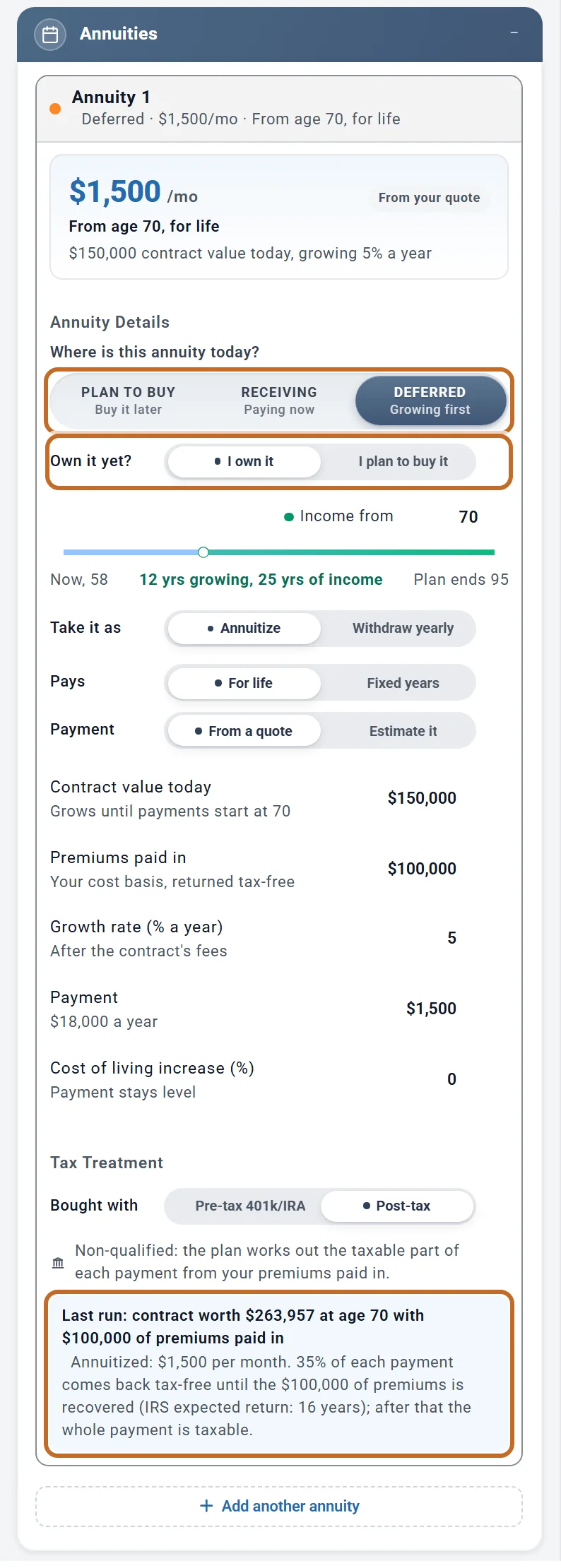
Here Chris owns a contract worth $150,000, with $100,000 paid in, growing 5% a year. By 70 it is worth $263,957. Annuitized at $1,500 a month (from a quote), 35% of each payment comes back tax-free until the $100,000 is recovered. Taken instead as $20,000 a year of withdrawals from 58, it runs out at 67, and the box says "The contract runs out at age 67; payments stop then."
- The contract grows at the fixed rate you enter, not with the plan's market returns, in Chance of Success too.
- When you annuitize, the contract value drops to $0 at Income from: the insurer holds the money from then on.
- If yearly withdrawals empty the contract, the payments stop and the plan's warnings say "A deferred annuity contract runs out before the plan ends", unless Runs out is Pays for life.
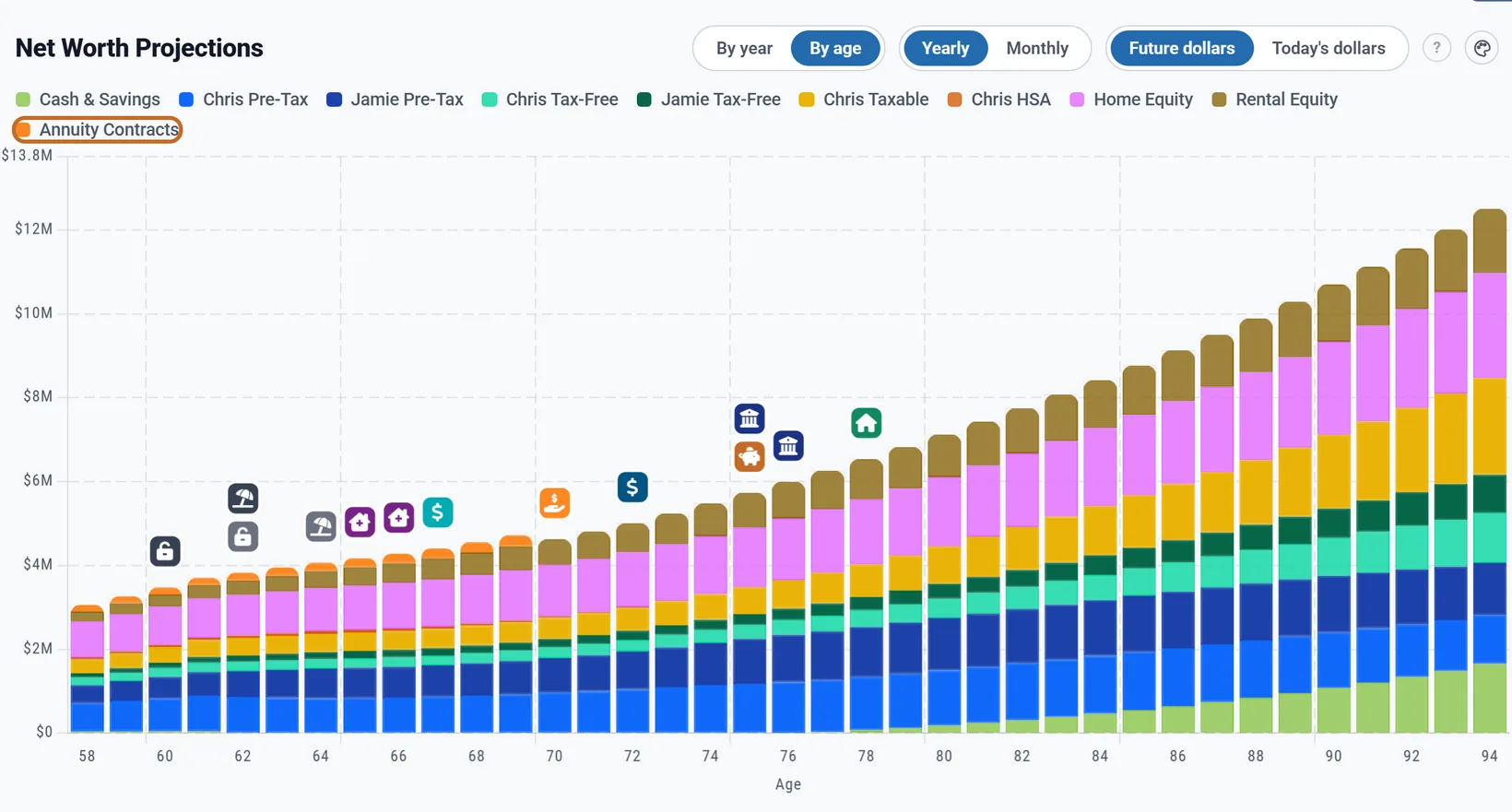
- The contract value counts in your net worth (the "Annuity Contracts" band on the Net Worth chart, "Annuity contracts" on the Summary), but not in your portfolio: your withdrawal rate and when your money runs out leave it out.
A fixed annuity with a term (a MYGA)
A multi-year guaranteed annuity (MYGA) pays a fixed rate for a set number of years, often lets you withdraw part of its value each year without a surrender charge, and then reaches the end of its term. Enter it as a Deferred annuity with its guaranteed rate as the Growth rate (% a year), then:
- Take it as Withdraw yearly, with Income from at the age of your first withdrawal.
- Amount: % of value and the percent your contract allows each year, often 10%. The plan does not model surrender charges, so keep the withdrawals within what your contract allows.
- Until: A date, and Term ends at the month and year your contract matures. The plan grows the contract until that month, so a five-year term earns five full years. (An age ends the term on a birthday instead, which can be up to a year off the maturity date.) If you take nothing out before then, set Yearly withdrawal to $0.
- Then: Roll it over if you will renew it or exchange it straight into a new annuity (a 1035 exchange): nothing is paid to you and nothing is taxed that year, and your premiums and the gain left carry into the new contract. Then set the new contract's New growth rate (% a year), its New term (years), the Yearly withdrawal in the new term (%) it allows (from its second year; 0 for none), and After that: what happens when the new term ends. Keep growing keeps the contract growing at the same rate with no more withdrawals. Cash it out if you will take the money: the whole value is paid to you at that age, the gain left is taxed as ordinary income that year (with the 10% penalty before 59 1/2 when that setting is on), your premiums left come back tax-free, and the money goes into your cash.
Cashing out a MYGA and buying a new annuity with the money is not the same as rolling it over: the cash-out is taxed that year. A direct exchange between the insurers is not, which is what Roll it over models.
Withdrawals take the gain first, so every dollar withdrawn is taxed until the gain is used up. Taking part of the gain each year spreads that tax over the term, so less of it lands in the year you cash out. The cash-out year's income also counts toward Medicare's IRMAA two years later, which the plan includes. For a contract held in an IRA, Then does not show: at the end of its term it usually moves to another IRA, so the plan keeps it growing and counting toward your RMDs.
A deferred annuity held in an IRA
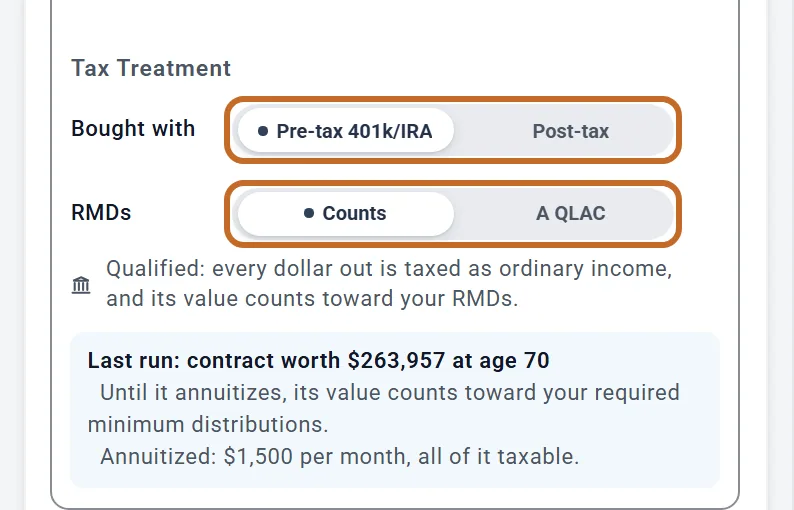
For a contract held in an IRA, or bought with IRA or 401(k) money, set Bought with to Pre-tax 401k/IRA. US
- Every dollar it pays is taxed as ordinary income, so there is no Premiums paid in.
- Until it starts paying, its value counts toward your required minimum distributions (RMDs), like any IRA balance: RMDs reads Counts. Choose A QLAC for a qualifying longevity annuity contract, which is left out of RMDs (one bought for up to $210,000, the 2026 limit, that starts paying by 85).
- The plan takes that part of the RMD from the contract's own withdrawals first, then from your other pre-tax accounts, and from the contract itself if those run out. Money the RMD takes out of the contract lowers what it later annuitizes, and the payment falls in proportion.
- Annuitized, the contract leaves the RMD at Income from: its payments cover its own part.
- Withdrawn yearly, the withdrawals count toward the RMD while the value lasts. With Pays for life (an income rider) the value runs down to $0 and the insurer keeps paying, and from then on the contract adds nothing to your RMDs.
Held in an IRA, Chris's contract above pays the same $1,500 a month, all of it taxable. Chris annuitizes it at 70, before RMDs start at 75, so in this example its value never adds to an RMD.
How annuity payments are taxed
The taxable part of every payment is ordinary income. The box says which part under Tax Treatment, for example "Every payment is taxed as ordinary income" or "40% of each payment is taxed as ordinary income". US
- Bought with pre-tax money (inside an IRA or 401(k)): every payment is fully taxable.
- Post-tax, Receiving: the Taxable portion (%) you enter, from your 1099-R, for as long as it pays. 0% is allowed.
- Post-tax, Plan to buy: your Taxable portion (%) until the tax-free parts add up to the premium; after that every payment is fully taxable.
- Deferred, annuitized: the plan works out the tax-free part with the IRS exclusion ratio (your premiums over the expected return). Raises are fully taxable, and once the premiums are back every payment is taxable.
- Deferred, bought with pre-tax money (in an IRA): every dollar out is fully taxable, and none of it is net investment income.
- Deferred, withdrawn yearly: gains come out first and are taxable, then your premiums, tax-free. Before 59½ (the Primary's age), withdrawn gains also pay the 10% early-withdrawal penalty while Apply the 10% early-withdrawal penalty to pre-59½ withdrawals in the Taxes box is on (the default). For Chris, retired at 58 and taking $20,000 a year, that is $166.67 a month until 59½. Annuitized payments never pay it.
See it in your results
- The line under each pension's Pays comes from the last calculation, so it shows the real first and last month.
- An annuity's summary shows the payment in the box, as you entered or estimated it. What the plan actually did is in the "Last run" lines under Tax Treatment: what a purchase cost and where the money came from, or how a deferred contract grew and pays out.
- The Income chart on the Dashboard has a band for each one, such as "Pension 1 (Chris)" and "Annuity 1".
- The More menu adds Pensions once a pension is on: your pensions and your Social Security, year by year. Guaranteed Income shows Social Security, pensions, annuities and Other Income together.
- Click a year on a chart for its Tax Details (see The Tax Details of a year).
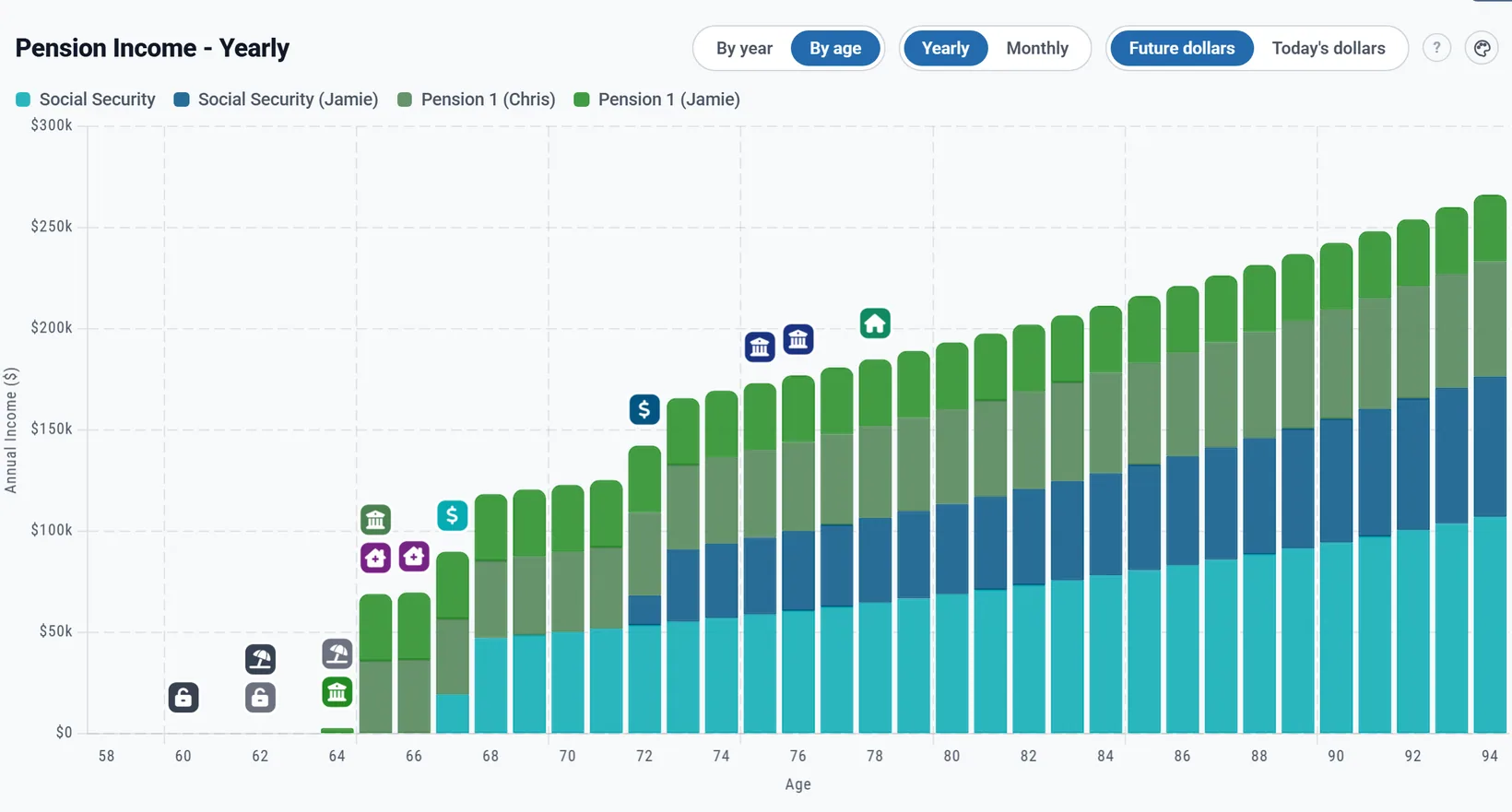
Pensions and Social Security are income, not savings: they are not part of your net worth. Only a deferred annuity's contract value is.
On a Preview account
On a Preview account the pension and annuity boxes work, with some rows locked. Planner+ The Pension Planner page opens too: the two amount rows are marked "Planner+", and the view of who dies first on its chart and the results of Compare my pension options need Planner+.
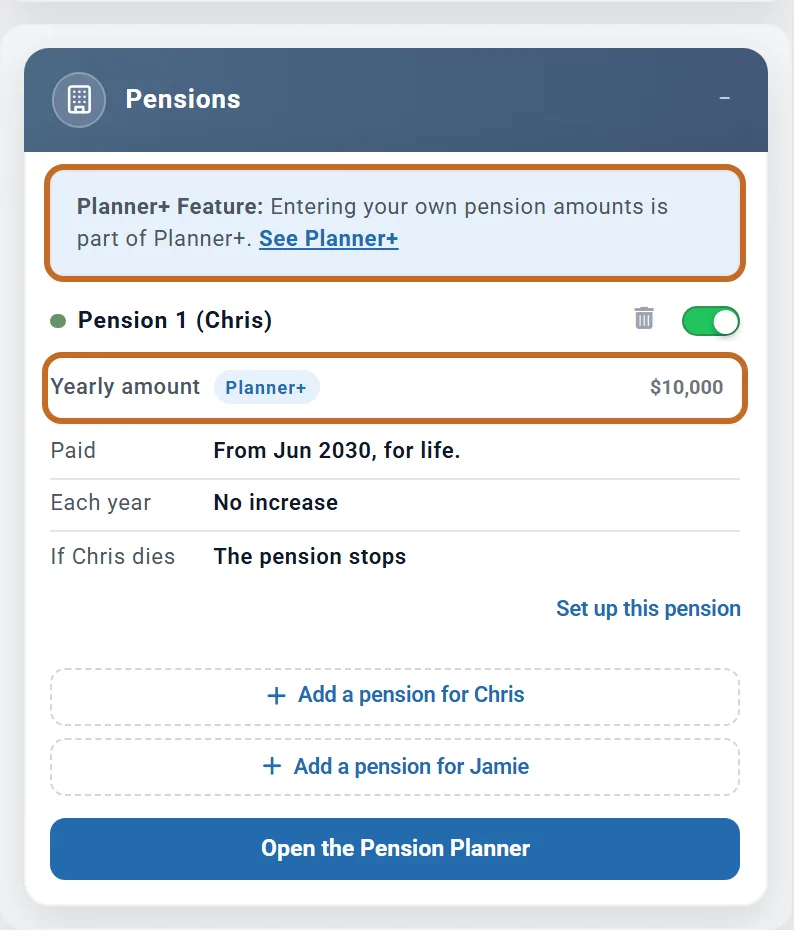
Pensions. Pension 1, Pension 2 and the (Spouse) boxes say "Planner+ Feature: Pension customization is available to Planner+ subscribers. Upgrade to Planner+ to model your exact pension benefits."
- Locked: Yearly Amount and Monthly Amount.
- Not locked: Start:, Starting Age, Pays, the yearly increase, Survivor Benefit (%) and This is a government pension.
- The pension's $10,000 a year ($833 a month) runs in your plan and cannot be changed. For a Primary still working it starts when they retire (see Check when it starts), so set Start: or Starting Age, or delete the pension if you do not want an example pension in your plan.
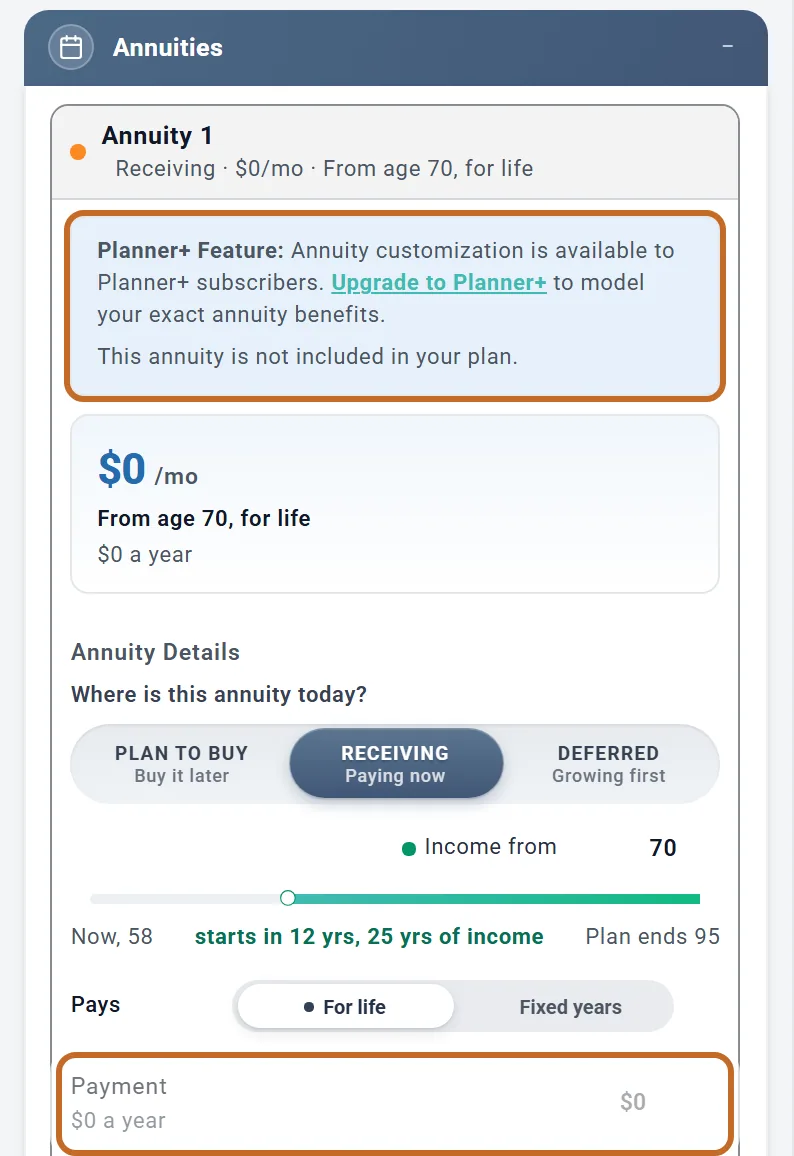
Annuities. Each annuity's card says "Planner+ Feature: Annuity customization is available to Planner+ subscribers. Upgrade to Planner+ to model your exact annuity benefits." A new annuity is set to Receiving at $0 and adds "This annuity is not included in your plan."
- Locked: Buy at, Purchase amount, Contract value today, Premiums paid in, Growth rate (% a year), Pay for purchase from and the Payment.
- Not locked: Where is this annuity today?, Income from, Pays, Cost of living increase (%), Bought with and Taxable portion (%). Choosing Plan to buy keeps the purchase at $0, so no example annuity runs in your plan.
- An annuity saved in your plan before keeps running, with those rows locked.
- Defined Benefit Pension boxes (outside the US) have no note and nothing locked.
- The Income, Pensions, Guaranteed Income and Net Worth charts are part of Planner+.
Outside the US
Change Location in your profile first, so the planner offers your country's boxes. Amounts are in your plan's currency.
| Feature | US | Canada | UK | Australia and others |
|---|---|---|---|---|
| Pension 1, Pension 2 and the (Spouse) boxes | Yes | Yes | Yes | Yes |
| Defined Benefit Pension 1 and 2 | No | Yes | Yes | Yes |
| This is a government pension | State tax, in six states | Shown, changes nothing | Shown, changes nothing | Shown, changes nothing |
| Pension credit and pension splitting | No | Yes, at any age | No | No |
- Defined Benefit Pension 1 and 2 are for a final salary or career average pension. They belong to the Primary, start at 65 with $10,000 a year and a 2% raise (labelled Annual Increase (%)), and can start from 50. They have the same Start:, Pays and Survivor Benefit (%) choices, no government pension box and no Planner+ lock. Your spouse's workplace pension goes in Pension 1 (Spouse) or Pension 2 (Spouse).
- Government pensions (CPP and OAS, the State Pension, the Age Pension) have their own box.
- Canada: every pension in these boxes is eligible pension income at any age. Each person's pension is on their own return, and it gets the pension income amount credit and, with Apply pension income splitting (Canada) on (in the Taxes box, on unless you switch it off), can be split with your spouse. An annuity's taxable part is on the Primary's return and gets neither. Canada
- UK: pensions are taxed in your income tax bands, on the owner's return, with no National Insurance. Defined Benefit pensions and annuities are on the Primary's return. A tax-free lump sum from a pension scheme is not modelled. UK
- The Deferred annuity stage shows in every country, but works out the tax-free part of each payment with the IRS's exclusion ratio, so outside the US treat its tax as a rough guide. A contract bought with pre-tax money counts toward minimum withdrawals in the US only.
What the planner does not model
- An increase that follows inflation: pensions and annuities rise only by the fixed percent or dollars you enter.
- A lump-sum option on a pension. If you will roll a lump sum into an IRA, add a One-Time Benefit at that age into Pre-Tax (401k/IRA) (see An inheritance or other windfall): it is not taxed when it lands, and is taxed when withdrawn. A lump sum already rolled over is part of the IRA on Accounts & Assets.
- A pension's "period certain" guarantee, or a partly tax-free pension (from after-tax contributions): every pension dollar is taxed.
- A pension that goes back up when the spouse dies (build it as shown in A pension that goes back up).
- An annuity that stops or drops at a death: annuities pay to the end of the plan, with no survivor percentage.
- A Receiving annuity's raises step every 12 months from today, not from the anniversary of its first payment. (Its Fixed years do count from Income from: one begun at 55 for 10 years stops at 65.)
- The 3.8% Net Investment Income Tax on a post-tax annuity's taxable part (only a deferred contract's counts).
- An annuity belonging to the spouse: annuities use the Primary's ages.
- A deferred contract's market ups and downs: it grows at the fixed rate you enter.
- For an annuity held in an IRA: an income rider's benefit base (RMDs use the contract value you enter), a contract held in a Roth IRA, and the option to count annuitized payments toward your other IRAs' RMDs.
- Telling an in-state government pension from an out-of-state one, and Kentucky's rule for service before 1998.
For the full list of what the planner includes and leaves out, see the Learning Library article What ReadyAimRetire Models.