



 Continue with Google
Medicare: what the planner pays for you
From 65 the planner pays Medicare for you. Before 65 it pays nothing for health insurance unless you tell it to. This page covers both, and what you still need to add yourself. US
- Automatic from 65. For each person in your plan, the Medicare Part B premium and a Part D premium are charged from the month of their 65th birthday. You do not need to switch anything on.
- The amount: the standard Part B premium plus the national base Part D premium, $241.89 a month each in 2026, rising each year with your plan's inflation. A retiree plan you keep with Medicare can change this: see A retiree plan you keep with Medicare.
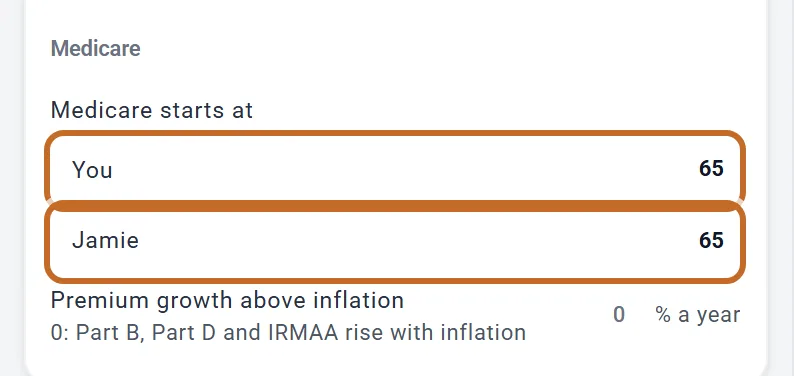
- Rising faster than inflation. Medicare premiums have often risen faster than prices. To plan for that, switch on the Health Care box, open its Medicare section and set Premium growth above inflation. With 3, the Part B and Part D premiums and any IRMAA charge rise 3% a year faster than your plan's inflation, starting next January. The IRMAA income tiers still rise with inflation.
- Leave them out of your spending. The planner already pays Part B, Part D and any IRMAA, so adding them to Desired Monthly Spending or your budget would count them twice.
Chris turns 65 in June 2033. From that month the plan pays Chris's Medicare, $301.56 a month in the dollars of that year. When Jamie turns 65 the charge doubles: $483.78 a month in today's dollars for the two of them.
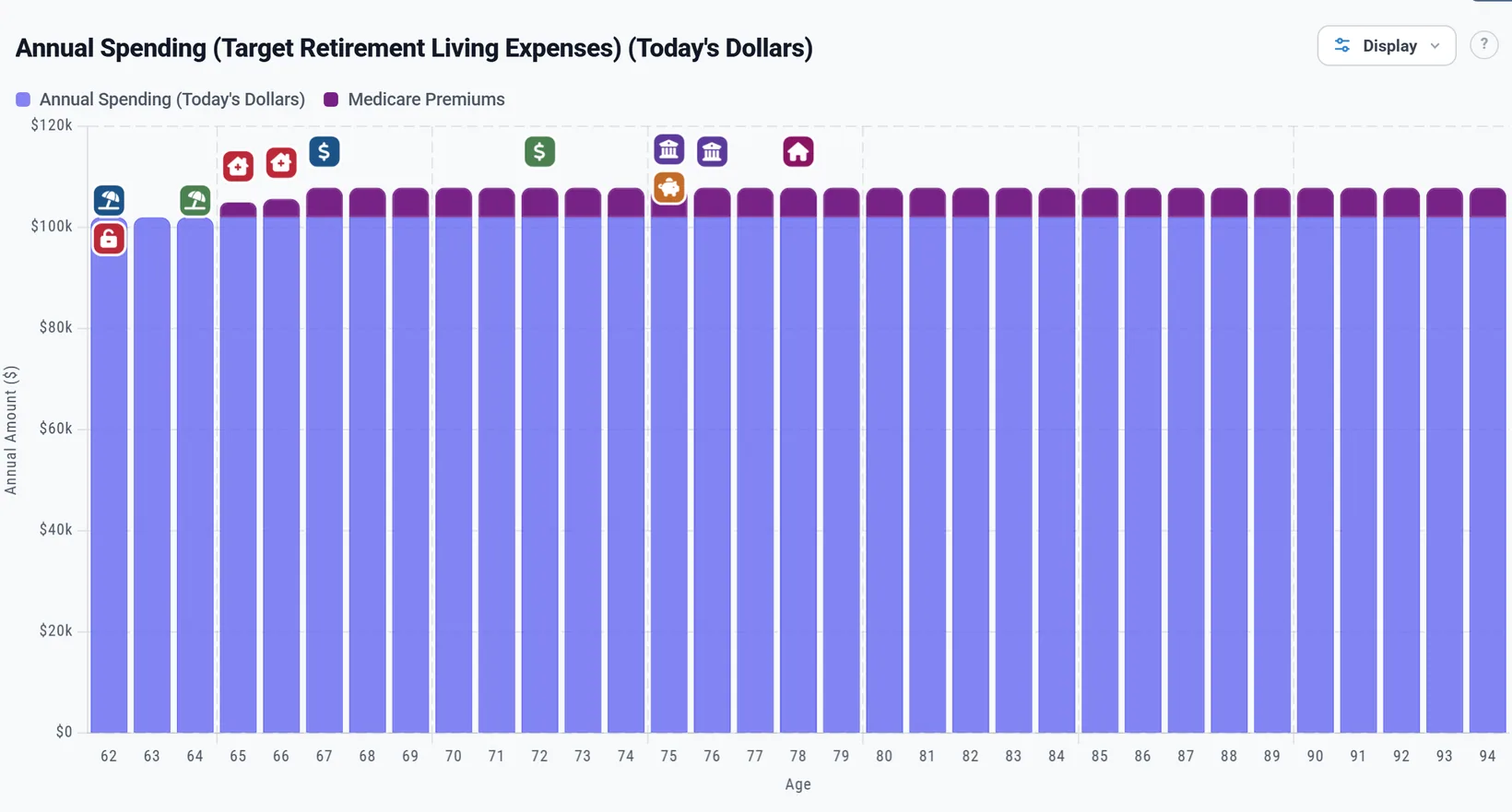
The premiums are counted with your taxes, so they also appear on the Taxes chart and in Your Taxes on the Summary.
Higher incomes and IRMAA
IRMAA is an extra charge on Medicare premiums for people with higher incomes. The planner adds it for you when your income calls for it.
- It looks back two years. Each year's IRMAA is set by your income from two years earlier, as Social Security does it. A big income year at 63, such as a large Roth conversion or a sale, raises your premiums at 65.
- The tiers start above $109,000 of income for a single person and $218,000 for a married couple filing jointly (2026), and rise each year with your plan's inflation. A plan can pay IRMAA for a few years and then stop, as the tiers rise past its income.
- For a couple, each person on Medicare pays the extra charge.
- When the first premiums depend on income from before the plan starts (for example, you are 63 or older today), the Taxes box shows Medicare IRMAA Lookback under Advanced Tax Modeling. Enter that income as Pre-retirement MAGI.
Chris and Jamie's income stays below every tier, so they pay no IRMAA. To keep your own plan under a tier, switch on Medicare surcharges (IRMAA) under Your limits, on the Roth & tax moves page of the Withdrawals tab: every Roth conversion and every Optimizer search then stays under the tier you pick.
The Learning Library article IRMAA and Medicare Surcharges shows where your own plan stands against the tiers, year by year.
What to add yourself, including long-term care
The planner charges only the standard Medicare premiums. Add these to your Desired Monthly Spending or your budget yourself:
- A Medicare supplement (Medigap), or what a Medicare Advantage or Part D plan costs above the base amount.
- Dental, vision and hearing.
- Deductibles, copays, prescriptions and other out-of-pocket costs.
- Long-term care.
Long-term care
Two ways to add care costs late in life:
- A budget row: on the Budget tab, Common expenses has Long-term care (late life), which fills in the last three years of your plan. Your plan uses it once the budget is linked with Use Budget. The row grows at 5% a year, because care costs have risen faster than prices; change its ages, amount or rate in the row. Planner+
- A milestone: a milestone at an age, on either person's age, with the action Add an expense in today's dollars, for a set number of years. This suits care for one of you at a particular age. Planner+
Avoid Extra Withdrawals for care: their ages are always the Primary's, so care that follows your spouse's age needs a milestone. A member's question about long-term care walks through the milestone, with screenshots.
The planner has no setting for a long-term care insurance policy. If you hold one, add its premium as a budget row for the years you pay it, and lower the care amount by what the policy would pay.
Retiring before 65
Unless you add it, the planner charges no health insurance premium before 65. If you retire before 65, add marketplace coverage, add the premium you expect, or both.
- In the Add box, under Expenses, switch on Health Care.
- The card at the top of the box shows when your plan has years before Medicare. For Chris and Jamie: "You from 62 to 65 (3 yrs) and Jamie from 63 to 65 (2 yrs)." Under it, a line for each of you shows those years as Not included, then Medicare.
- Click Include marketplace (ACA) premiums in my plan on the card. (The same switch is in the box's Marketplace section.)
This adds the premiums to your plan: in each month someone is retired and not yet on Medicare, the plan pays the marketplace premium less the subsidy (the premium tax credit) that year's income earns, on top of your spending. Do not also put these premiums in your budget. Switched off, the plan charges no marketplace premium at all.
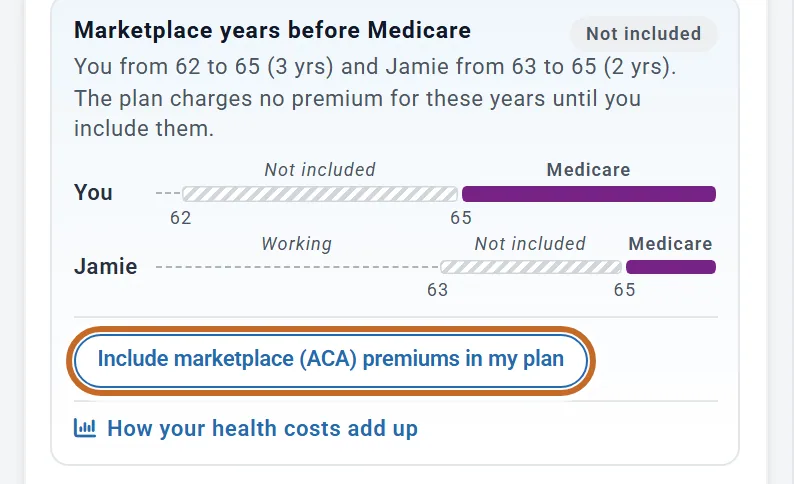
The plan then charges each of you a marketplace premium from your own retirement until the month before your 65th birthday, less the premium tax credit your income qualifies for. A person still working is assumed to have coverage from work. If its premium comes out of your pay before tax, enter it in the Employment Income box as Health premiums from pay: the plan takes it off the pay your taxes are worked out on and pays it from your take-home pay until that salary stops.
The box's Marketplace section rests folded, its settings on the row ("Included · 2 people · national average"); click it to open it. The "?" beside each setting explains it.
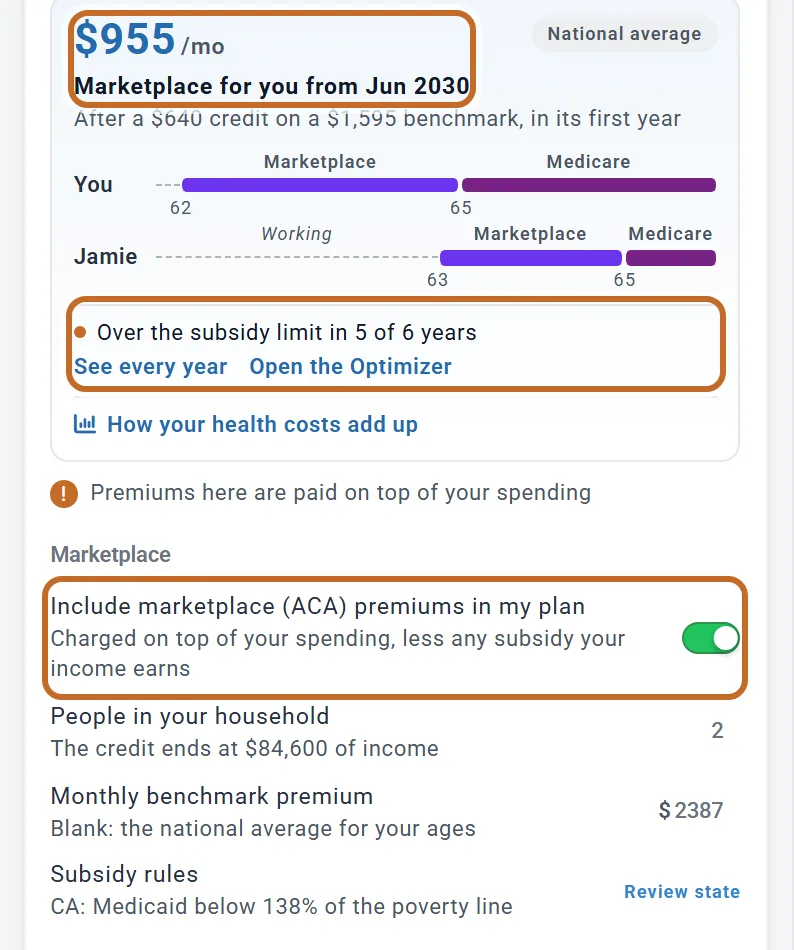
- People in your household: blank counts the two of you. It sets the income limit for the credit (for two, the credit ends at $84,600 of income).
- Monthly benchmark premium: blank uses the national average for your ages. For a closer figure, enter today's benchmark (second-lowest silver) plan for your household from healthcare.gov.
- Subsidy rules: below the subsidy range, your state's Medicaid rules apply. The state comes from Location in your profile.
- Under your state's Medicaid line (138% of the poverty level in a state that expanded Medicaid) the plan charges nothing. In a state that did not expand it, income below the poverty level gets no credit and pays the full premium. Above 400% of the poverty level there is no credit at all.
The card at the top then shows what the first year costs, in that year's dollars: for Chris, $955 a month, "After a $640 credit on a $1,595 benchmark". In the next two years Chris and Jamie's income is above the limit, so they get no credit and pay the full premium.
Under the figure, a line for each of you shows when each kind of coverage applies: an arrangement (below), the marketplace, then Medicare, with the ages and months it changes. Point at a line (or tap it) to read one month: who is covered by what, and the premiums your household pays that month, in that year's dollars, with any subsidy. Under the lines, one line says how many marketplace years are over the 400% limit. See every year lists your income in each marketplace year as a share of the poverty level, marks a year over the limit, under the poverty level or in Medicaid; Open Roth & tax moves goes to that page of the Withdrawals tab, where the Keep ACA subsidies limit under Your limits keeps Roth conversions under the line (or choose ACA subsidy limit as the target of a fill).
The credit is estimated each January from that year's income and settled when the tax year ends, as on a tax return.
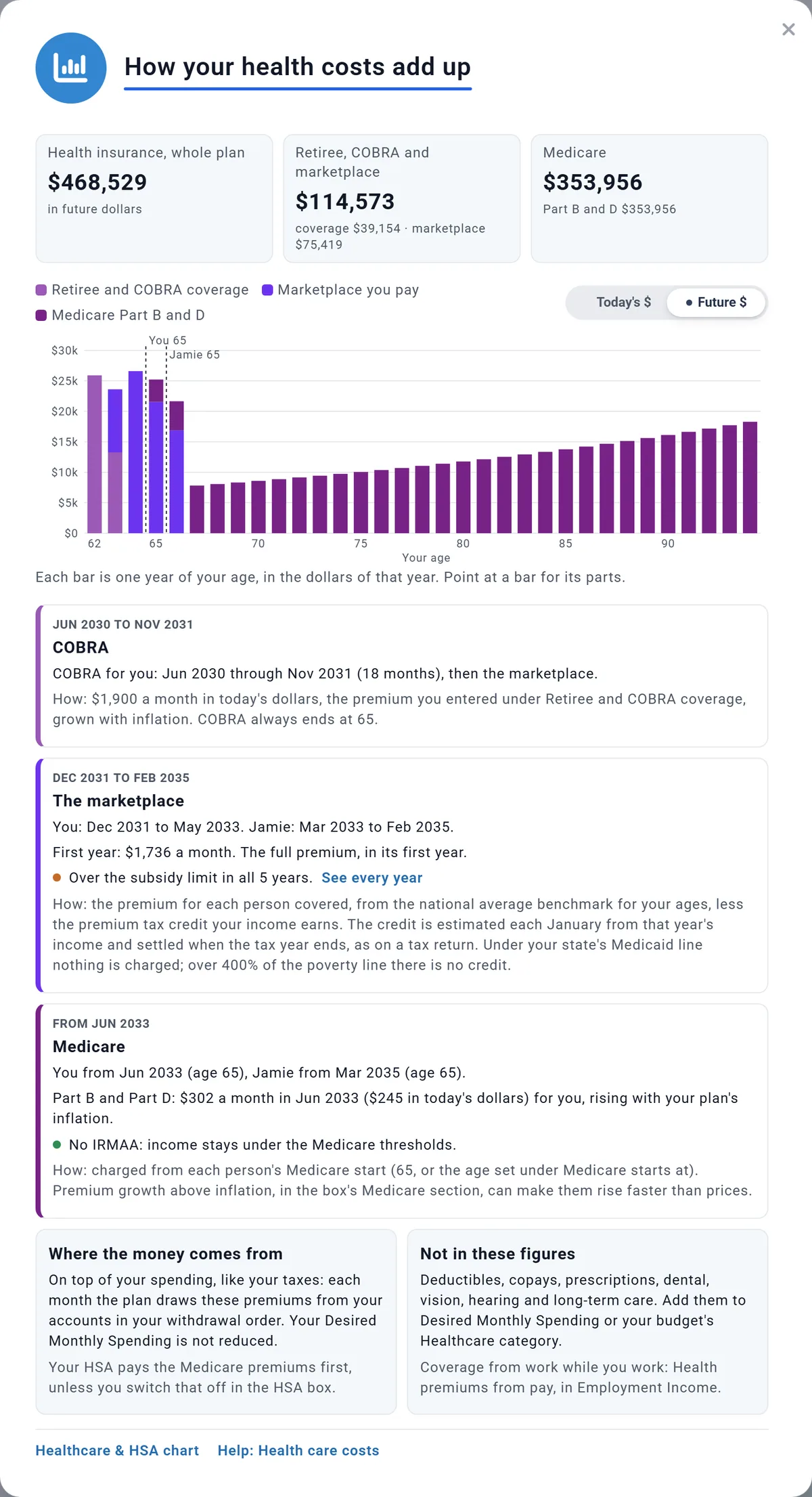
How your health costs add up, at the foot of the card, opens the whole story in one window (see How your health costs add up).
The income that counts is your income for tax plus all of your Social Security, taxed or not: pre-tax withdrawals, Roth conversions, realized gains, interest and dividends count. Spending cash, or money from a Roth account, does not.
The Learning Library article Health Insurance Before Medicare explains how the marketplace math works, and where one extra dollar of income can cost thousands.
COBRA, a retiree plan or your spouse's plan
If you will have COBRA, a retiree plan or a working spouse's plan before the marketplace, add it under Retiree and COBRA coverage:
- Click Add an arrangement.
- Choose Who it covers and the Type of plan.
- Enter the Monthly premium in today's dollars: one premium for the whole arrangement, even a family premium.
- Choose when it Starts and Ends: after a number of months, at an age, at Medicare, when your spouse retires, or, for any plan but COBRA, for life alongside Medicare (a retiree plan you keep with Medicare).
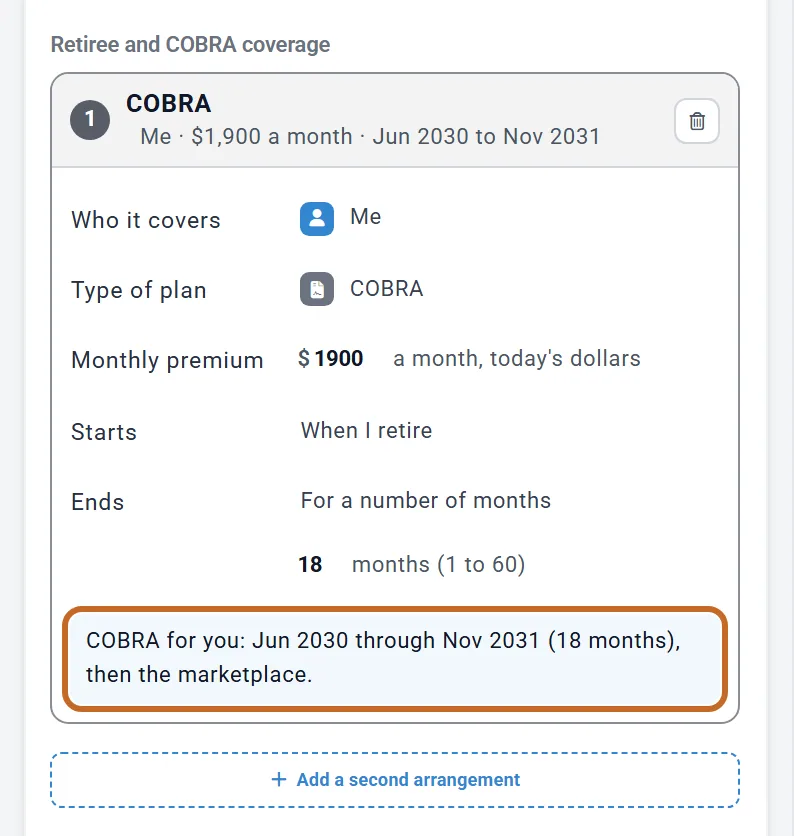
The line at the foot of the arrangement confirms the dates: "COBRA for you: Jun 2030 through Nov 2031 (18 months), then the marketplace." Its heading names the plan and sums it up ("Me · $1,900 a month · Jun 2030 to Nov 2031"), and the line for that person at the top of the box shows it before the marketplace. While the arrangement covers someone, the marketplace charges them nothing; it takes over the month the arrangement ends.
Already retired and already on COBRA? The plan starts this month, so When I retire starts the coverage now. Choose In a month I choose under Starts and pick the month and year it began instead. With For a number of months, the months before today count toward the total and are not charged: COBRA that began in January 2026 for 18 months runs through June 2027, and the plan charges only its months from now until then. The line at the foot of the arrangement says how many are already behind you. A plan that starts later than your retirement, a spouse's plan for example, can take a future month the same way.
When the premium changes, for example COBRA for 18 months and then a retiree plan, add a second arrangement. Two is the most. With two, one is open at a time: the other rests as its heading, and a heading whose arrangement has a warning says so (for example Overlaps 1). Click a heading to open it. The "?" beside Retiree and COBRA coverage explains how the arrangements work.
How your health costs add up
Click How your health costs add up at the foot of the box's card to see the whole story of your plan's health insurance in one window:
- Three totals: all of it, the retiree, COBRA and marketplace premiums, and Medicare (Part B and D and any IRMAA).
- A bar for each year of your age with each kind of premium in its own colour. Point at a bar for its parts; Today's $ and Future $ switch the dollars.
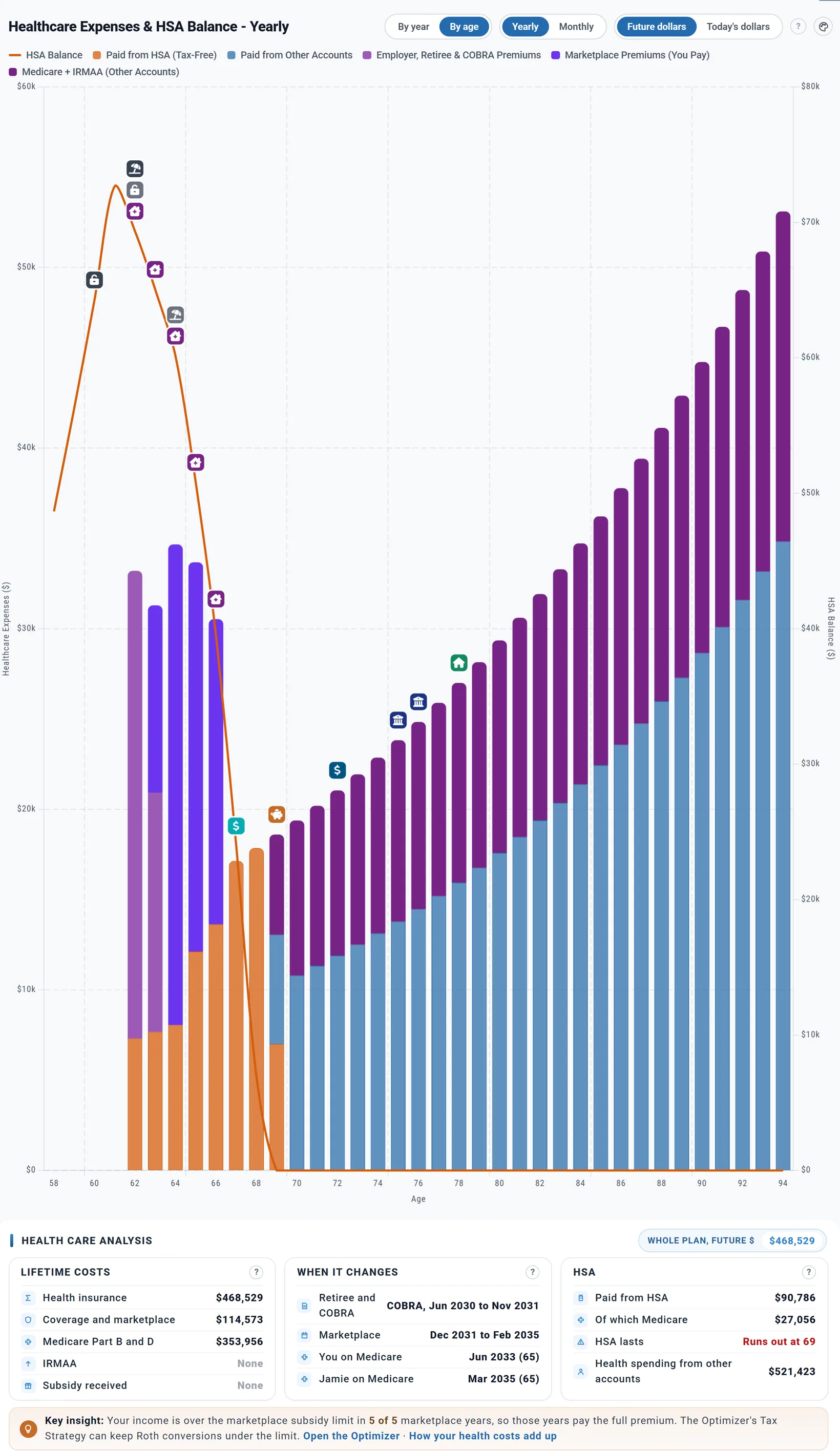
- One box for each stretch of time, in the order it happens: your COBRA or retiree plan, the marketplace, then Medicare, each with its months, what it costs and how the plan works it out. For Chris and Jamie: COBRA from June 2030 to November 2031, the marketplace to February 2035 with no subsidy (their income is over the limit), then Medicare from each 65th birthday.
- Where the money comes from (on top of your spending, from your accounts like your taxes) and what is not in these figures (out-of-pocket costs, dental, vision, hearing, long-term care).
Every figure is the plan's own: the window adds up what the plan charges each month.
Staying on an employer plan past 65
If you or your spouse will keep employer coverage past 65, and delay Medicare:
- Switch on the Health Care box.
- Open its Medicare section (it rests folded) and set Medicare starts at for that person.
- Add that employer plan's premium. Once that person has retired, add it under Retiree and COBRA coverage as an Employer or retiree plan: it runs to that age. For the years they are still working, enter it in their Employment Income box as Health premiums from pay when it comes out of their pay before tax, or in your budget when it does not.
Until that age the plan charges that person no Medicare and no IRMAA. With Chris's set to 67, the section's heading reads "Starts at 67 for you and 65 for Jamie", and Chris's line at the top of the box starts Medicare at 67.
- The setting lives in the Health Care box: switch the box off and Medicare starts at 65 again.
- The marketplace still ends at 65 for each person.
- COBRA always ends at 65: COBRA is not coverage from current work, so putting off Medicare on it brings a late-enrollment penalty.
- If you have an HSA box, it has its own Medicare age for stopping contributions. Set both.
- Use it only for real employer coverage: the plan does not charge the penalty for enrolling in Part B late.
A retiree plan you keep with Medicare (FEHB, PSHB, TRICARE)
Federal retirees can keep FEHB, postal retirees PSHB, and military retirees have TRICARE. Many state, school and company retiree plans carry on after 65 too.
To model one:
- Switch on the Health Care box.
- Under Retiree and COBRA coverage, click Add an arrangement.
- Choose the Type of plan: Federal employee plan (FEHB), Postal Service plan (PSHB), TRICARE (military retiree) or Employer or retiree plan. A federal, postal or TRICARE card switches Ends to For life, with Medicare; any plan but COBRA can use it.
- Enter the Monthly premium you pay today in today's dollars (for TRICARE Prime or Select, the yearly enrollment fee divided by 12).
- Under With Medicare, choose the Medicare parts your plan works with.
- Premium with Medicare. Leave it blank when the premium does not change at 65, as for FEHB and PSHB. TRICARE For Life has no premium, so a TRICARE card starts at $0. The new premium starts in the month everyone the card covers has Medicare.
- Medicare Part B. Skip charges no Part B premium and no Part B IRMAA: FEHB lets a retiree skip it. Enrolling later brings Medicare's late-enrollment penalty, which the planner does not add. PSHB requires Part B unless you were a postal annuitant on January 1, 2025, or an employee 64 or older then. TRICARE For Life requires it.
- Drug coverage. FEHB and PSHB include their own Medicare Part D plan: no Part D premium, but Part D IRMAA still applies at higher incomes, as for any Part D plan. Plan's own is drug coverage that is not a Part D plan (TRICARE Pharmacy, or an FEHB member who left the plan's Part D plan): no Part D premium and no Part D IRMAA. Buy Part D charges the base Part D premium, as without the plan.
- Part B the plan pays back. Some plans pay back part of the Part B premium each year, for example an FEHB plan's Medicare reimbursement account or a Medicare Advantage giveback. Enter the yearly amount per person from your plan's brochure; it lowers that person's Part B premium, never below zero.
- Premium growth above inflation. Retiree premiums have risen faster than prices: OPM reports that the average FEHB premium you pay rose 12.3% for 2026 and 10.9% for 2027. Set an extra yearly rise here; 0 grows the premium with your plan's inflation.
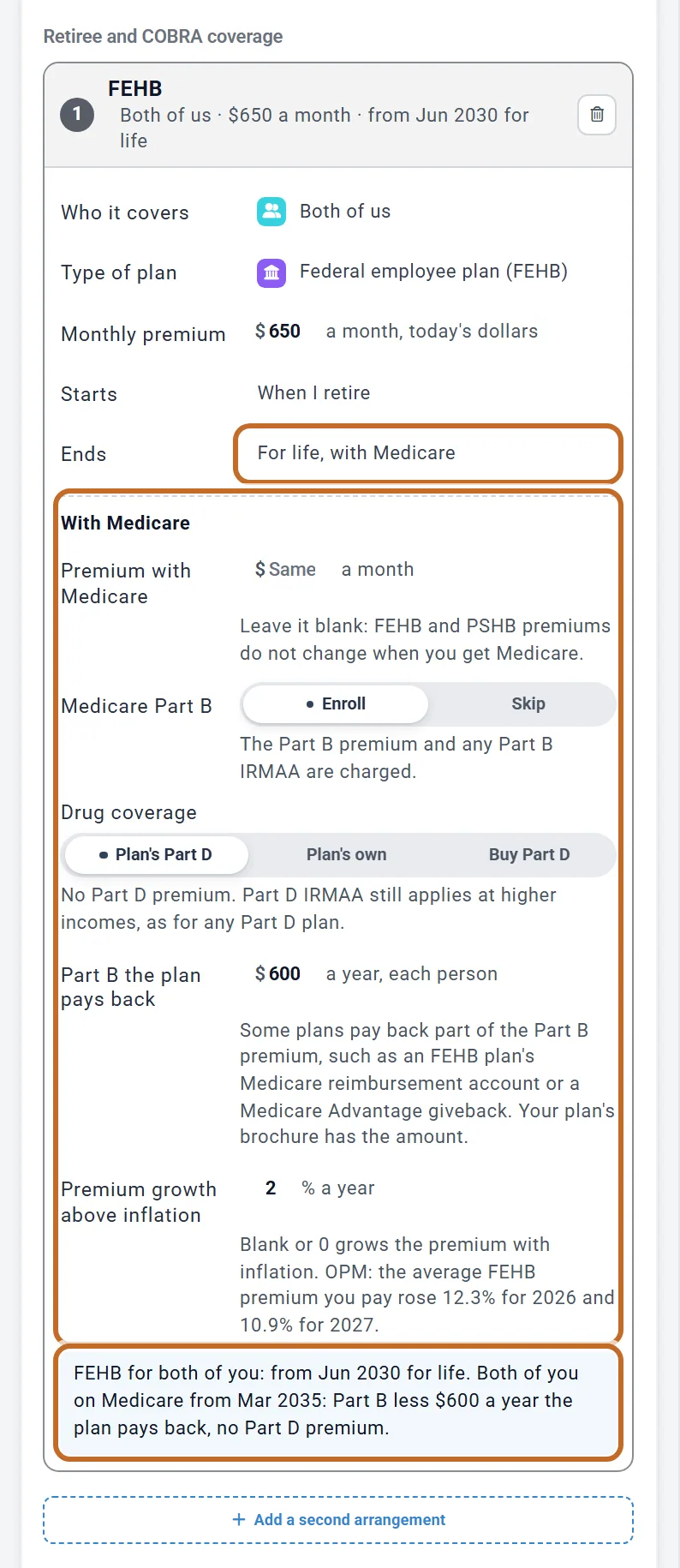
The line at the foot of the arrangement confirms it. In the example: "FEHB for both of you: from Jun 2030 for life. Both of you on Medicare from Mar 2035: Part B less $600 a year the plan pays back, no Part D premium." At the top of the box, each person's line shows the plan before Medicare, then "FEHB with Medicare". The box's Medicare section sums it up as "Part B and D as your FEHB sets them". The premium is paid on top of your spending for the rest of each covered person's life, and the Medicare premiums on the Taxes and Spending charts follow your choices.
- Retiree premiums are paid after tax, so the planner does not deduct them.
- A card that covers both of you keeps covering the survivor at the same premium. FEHB continues for a spouse only with Self Plus One or Self and Family enrollment and a survivor annuity; if yours does not, cover only yourself.
- Do not also put the premium in your budget.
Medicare before 65 (disability)
Medicare can start before 65: after 24 months of Social Security Disability (SSDI) benefits, or with kidney failure or ALS. To plan for it:
- Switch on the Health Care box.
- Open its Medicare section and set Medicare starts at for that person to the age Medicare started, or will start. Already on Medicare? Enter your current age.
From that birthday the plan charges Part B and D and any IRMAA for that person, as it would from 65, the section's heading reads "Starts at 62, before 65 (Medicare through disability)", and that person's line at the top of the box goes straight to Medicare at 62.
- Marketplace coverage ends there for that person (there is no premium tax credit while you have Medicare), and so does any arrangement under Retiree and COBRA coverage, COBRA included, unless it runs For life, with Medicare: then it carries on beside Medicare.
- HSA contributions stop there, as the law requires once you have Medicare. Before 65 your HSA cannot pay Medicare premiums tax-free; from 65 it can.
- Medigap before 65 can cost more, or not be sold at all, depending on your state. Add any Medigap or Medicare Advantage premium to your budget yourself.
Getting SSDI itself is set up in the Social Security box: see If you get disability benefits (SSDI).
Your HSA
If you have a health savings account on Accounts & Assets, the plan uses it for Medicare even with no HSA box: from the owner's 65th birthday, the HSA pays the Medicare premiums, tax-free, in months the plan would otherwise take that money from your investments. Over Chris and Jamie's plan, Chris's HSA pays $83,207 of their Medicare.
Once its owner is 65, the HSA pays your spouse's premiums too. It keeps its money invested in a month your cash, your income or a required withdrawal already pays for, and always with Using the 4% Rule or Make withdrawals in addition to other income, where the withdrawal is fixed. When the HSA runs out, the rest is paid from your other money.
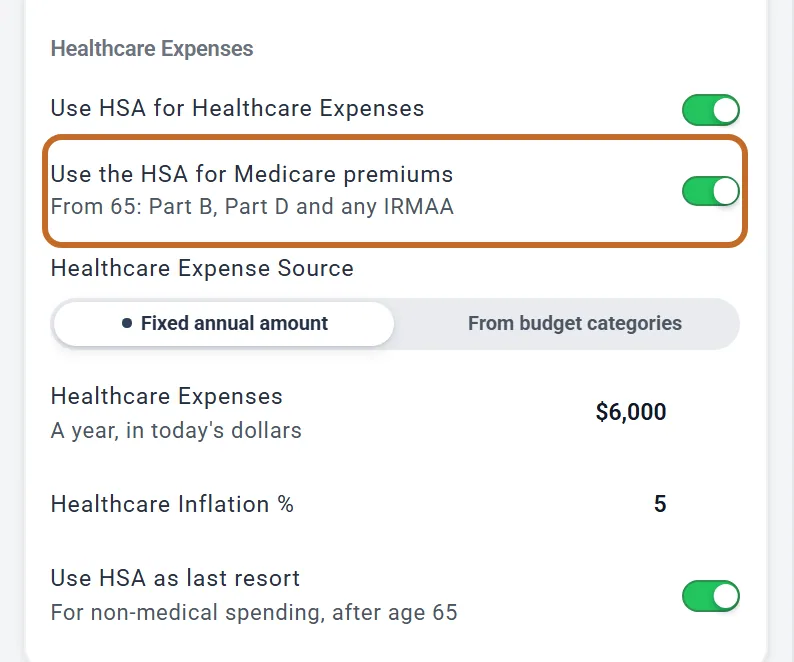
The HSA (Health Savings Account) box, under Tax Planning in the Add box, adds more control. Its Healthcare Expenses section rests folded, with its settings on the row (for example $6,000/yr · premiums on); click the row to open it:
- Use HSA for Healthcare Expenses: how much of your spending is healthcare, paid from the HSA tax-free from retirement. It is part of your spending, not added to it. It starts at $6,000 a year when you add the box. Enter it in today's dollars: it grows from today at the box's own Healthcare Inflation % (5% to start).
- Use the HSA for Medicare premiums: on unless you switch it off.
- Use HSA as last resort (for non-medical spending, after age 65): after 65 the HSA can also pay ordinary spending as a last resort, taxed as income. It is on unless you switch it off, and it is used only once your investment accounts are empty.
- Healthcare Expense Source: Fixed annual amount (the amount above), or From budget categories, which adds up the budget rows ticked HSA Eligible - This is a qualified medical expense on the Budget tab (new health care rows start ticked).
The "?" beside each setting explains it.
The box works with an HSA owned by the Primary. Without one it offers Add HSA Account.
Contributions and growth
The box's Contributions section:
- Coverage Type: Self-only or Family. It sets the yearly limit ($4,400 or $8,750 in 2026).
- Annual Contribution: what goes in each year, as twelve equal monthly deposits. It cannot pass the year's limit, which includes the extra $1,000 allowed from the year you turn 55; the line under it shows this year's limit for you. The amount you enter does not rise with inflation; the limit does, after 2026.
- Contribute until: When I retire (where a new HSA starts: the month you retire, so it moves with your retirement age), Medicare (the Health Care box's Medicare starts at, 65 unless you change it) or A specific age (any age, set in Stop at age). Every choice stops at Medicare at the latest, because nobody can contribute once on Medicare. The line under it says when they stop.
- Annual Growth Rate: how fast the HSA grows each year, 5% unless you change it.
While you work, the contributions come out of your pay. If they carry on after you retire, the plan pays them along with your spending, like a bill. Either way they are deducted from your taxable income. Contributing after you retire needs health coverage that allows it: COBRA of an employer's high-deductible plan, a spouse's high-deductible plan, or from 2026 a bronze or catastrophic marketplace plan.
Where to see your health costs
- Healthcare & HSA (Dashboard, More menu): premiums and healthcare spending by year, one bar for each year, what the HSA paid, and the HSA balance. Any premium tax credit sits on top of a bar as a green band, ACA Subsidy (Not Your Cost): the bar's full height is the full premium and the parts under the green are what you pay. Under the chart, Health Care Analysis takes the place of the Retirement Plan Analysis: your lifetime health insurance costs, when your coverage changes, what your HSA pays and when it runs out, and one key insight with its fix. It is listed once the Health Care or HSA box is on.
- Taxes and Spending charts: Medicare and IRMAA, marketplace premiums, and employer, retiree and COBRA premiums, each in its own colour.
- IRMAA (More menu): appears only when your plan pays IRMAA. AGI Tracker (More menu) shows your income against the IRMAA tiers; remember the two-year lag, which is why its IRMAA lines start two years before Medicare.
- Your Taxes on the Summary: lifetime Medicare and IRMAA. The Summary's income thresholds card shows whether you cross an IRMAA tier or the marketplace income limit.
Outside the US
The Health Care and HSA boxes, Medicare and IRMAA are for US plans only. Elsewhere, add health insurance, care and out-of-pocket costs to your spending or your budget.
- Canada: the Ontario Health Premium is included in Ontario provincial tax.
- Australia: the 2% Medicare levy is included in income tax. The private health insurance rebate is not modeled.
What the planner does not model
- Medigap and Medicare Advantage premiums, and Part D plans above the national base premium: add them yourself.
- A separate medical inflation rate for the marketplace: its premiums grow with your plan's inflation and your ages. Medicare premiums can have their own extra rise (Rising faster than inflation), an arrangement kept with Medicare has its own, and the HSA box's healthcare amount has its own rate.
- The penalty for enrolling in Part B late.
- For a retiree plan kept with Medicare: FEHB's five-year rule for keeping coverage into retirement, a lower Self Only premium after a death (one premium covers a card), and Medicare Advantage beyond its premium and its Part B giveback.
- COBRA's enrollment-window rules, and Medicare starting a month early for people born on the first of a month.
- Cost-sharing reductions, or a marketplace plan other than the benchmark: the plan charges the benchmark premium less your credit.
For the full list of what the planner includes and leaves out, see the Learning Library article What ReadyAimRetire Models.